Windows)Python)シンプルな電卓(数式・四則演算エディタ)アプリ作成。Nuitkaでexe化。ICOアイコン付きで。
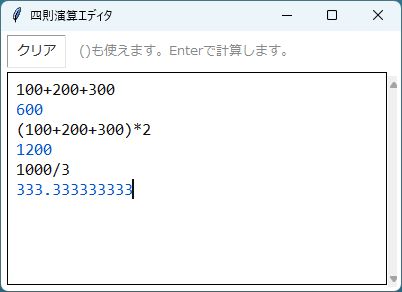
Pythonで、Windows用のシンプルな電卓アプリを作成。
- よくある電卓アプリのような数字や+-*/のボタンはない。
- 四則演算しかできない。
- ()は使える。
- 単に数式を入力してEnterキーで計算するだけ。
- 一度計算した数式を修正してEnterキーで再計算できる。
【Python「calculator.pyw」ソースコード】
import tkinter as tk
import re


def safe_eval(expr):
    cleaned = re.sub(r'\s', '', expr)
    if not cleaned:
        return None
    if not re.fullmatch(r'[0-9+\-*/().]+', cleaned):
        raise ValueError("使用できない文字")
    return eval(cleaned, {"__builtins__": {}}, {})


def fmt(r):
    if isinstance(r, float):
        return str(int(r)) if r.is_integer() else f"{r:.12g}"
    return str(r)


def has_operator(s):
    return bool(re.search(r'[+\-*/]', s))


class App(tk.Tk):
    def __init__(self):
        super().__init__()
        self.title("四則演算エディタ")
        self.configure(bg="white")
        self.resizable(True, True)
        self.update_idletasks()
        W, H = 400, 260		# ウインドウサイズ
        x = self.winfo_screenwidth() - W - 48	# デスクトップ右から
        self.geometry(f"{W}x{H}+{x}+16")	# デスクトップ上から
        self._build()

    def _build(self):
        top = tk.Frame(self, bg="white")
        top.pack(fill=tk.X, padx=6, pady=4)
        tk.Button(
            top, text="クリア",
            font=("Meiryo", 10),
            command=self._clear,
            relief=tk.GROOVE, bd=1,
            bg="white", fg="#333",
            padx=6, pady=1,
        ).pack(side=tk.LEFT)
        tk.Label(
            top, text="()も使えます。Enterで計算します。",
            font=("Meiryo", 10),
            bg="white", fg="#888",
        ).pack(side=tk.LEFT, padx=10)

        self.text = tk.Text(
            self,
            font=("Consolas", 13),
            bg="white", fg="#111",
            insertbackground="#111",
            bd=1, relief=tk.SOLID,
            padx=8, pady=6,
            wrap=tk.WORD,
            undo=True,
        )
        sb = tk.Scrollbar(self, command=self.text.yview, width=10)
        sb.pack(side=tk.RIGHT, fill=tk.Y, padx=(0, 4), pady=4)
        self.text.configure(yscrollcommand=sb.set)
        self.text.pack(fill=tk.BOTH, expand=True, padx=(6, 0), pady=(0, 6))
        self.text.focus_force()

        self.text.tag_config("res", foreground="#0055cc")
        self.text.tag_config("err", foreground="#cc2200")

        self.text.bind("<Return>",   self._on_enter)
        self.text.bind("<KP_Enter>", self._on_enter)

    def _calc_result(self, line):
        try:
            r = safe_eval(line)
            if r is None:
                return None, None
            return fmt(r), "res"
        except ZeroDivisionError:
            return "ゼロ除算エラー", "err"
        except Exception as e:
            return f"エラー: {e}", "err"

    def _on_enter(self, _=None):
        row = int(self.text.index(tk.INSERT).split(".")[0])
        line = self.text.get(f"{row}.0", f"{row}.end").strip()

        # 空行 or 演算子なし → 単純改行
        if not line or not has_operator(line):
            self.text.insert(tk.INSERT, "\n")
            self.text.see(tk.INSERT)
            return "break"

        result_str, tag = self._calc_result(line)
        if result_str is None:
            self.text.insert(tk.INSERT, "\n")
            return "break"

        # 常に現在行の末尾に改行を挿入し、結果を新しい行として追加
        # (既存の内容は押し下げられる)
        self.text.insert(f"{row}.end", "\n")
        next_row = row + 1
        self.text.insert(f"{next_row}.0", result_str, tag)
        self.text.mark_set(tk.INSERT, f"{next_row}.end")
        self.text.see(tk.INSERT)
        return "break"

    def _clear(self):
        self.text.delete("1.0", tk.END)
        self.text.focus_force()


App().mainloop()
【Nuitkaでexe化】
この電卓(数式・四則演算エディタ)アプリをNuitkaでexe化した。
exeアプリには電卓っぽいアイコンを付けた。

アイコンは、「icons8.com」から無料アイコン画像をダウンロード。
https://icons8.com/icons/set/calculator
「PNG ICO 変換」サイトでPNGファイルをICOファイルに変換したものを使用。
https://convertio.co/ja/png-ico/
nuitka --onefile --windows-console-mode=disable --enable-plugin=tk-inter --windows-icon-from-ico=icons8-calculator-48.ico --mingw64 calculator.pyw




晴歩雨描ブログ 写真補正・加工 ノウハウ記事一覧カメラ比較、写真色補正、色加工、アート加工、モノクロ化、合成加工、ゆがみ補正、解像度補正、超広角、宙玉、印刷。ok2nd.github.io