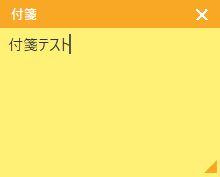
Windows)Pythonで、極力シンプルなデスクトップ付箋アプリ作成。
Windows標準の付箋アプリが微妙に使いにくかったので、極力シンプルな付箋アプリをPythonで作成。
- 付箋は一個だけ。
- 入力できるのは文字だけ。
- 付箋内容は保存され、次回起動時に表示される。
- 付箋のデスクトップ上の表示位置、表示サイズは記憶される。
- 付箋内容、表示位置情報は、「sticky_notes.json」に書かれる。
【Python ソースコード】
import tkinter as tk
from tkinter import font as tkfont
import json, os, sys

_BASE = os.path.dirname(os.path.abspath(sys.argv[0]))
SAVE_FILE = os.path.join(_BASE, "sticky_notes.json")

COLOR = {"bg": "#FFF176", "hd": "#F9A825"}

def load():
    default = {"text": "", "x": 200, "y": 150, "w": 280, "h": 220}
    try:
        saved = json.load(open(SAVE_FILE, encoding="utf-8"))
        for k in default:
            if k in saved:
                default[k] = saved[k]
    except Exception:
        pass
    return default

def save(text, x, y, w, h):
    with open(SAVE_FILE, "w", encoding="utf-8") as f:
        json.dump({"text": text, "x": x, "y": y, "w": w, "h": h},
                  f, ensure_ascii=False, indent=2)

d = load()

root = tk.Tk()
root.overrideredirect(True)
root.attributes("-topmost", True)
root.geometry(f"{d['w']}x{d['h']}+{d['x']}+{d['y']}")
root.configure(bg=COLOR["bg"])

# ヘッダー
hd = tk.Frame(root, bg=COLOR["hd"], height=28)
hd.pack(fill="x")
hd.pack_propagate(False)

title = tk.Label(hd, text="付箋", bg=COLOR["hd"], fg="white",
                 font=("Yu Gothic UI", 10, "bold"))
title.pack(side="left", padx=8)

cls_btn = tk.Label(hd, text="✕", bg=COLOR["hd"], fg="white",
                   font=("Yu Gothic UI", 11, "bold"), cursor="hand2")
cls_btn.pack(side="right", padx=6)

# テキスト
txt = tk.Text(root, bg=COLOR["bg"], fg="#333",
              font=tkfont.Font(family="Yu Gothic UI", size=11),
              relief="flat", bd=0, padx=8, pady=6,
              wrap="word", undo=True, insertbackground="#555")
txt.pack(fill="both", expand=True)
txt.insert("1.0", d["text"])
txt.focus_set()

# リサイズグリップ
grip = tk.Label(root, text="◢", bg=COLOR["bg"], fg=COLOR["hd"],
                font=("Yu Gothic UI", 10), cursor="size_nw_se")
grip.place(relx=1.0, rely=1.0, anchor="se")

def get_pos():
    root.update_idletasks()
    x, y = root.winfo_x(), root.winfo_y()
    w, h = root.winfo_width(), root.winfo_height()
    if x == 0 and y == 0:
        x, y = d["x"], d["y"]
    if w <= 1 and h <= 1:
        w, h = d["w"], d["h"]
    return x, y, w, h

# ── ドラッグ ──
ds = {}
def drag_start(e):
    root.update_idletasks()
    ds["ox"] = e.x_root - root.winfo_x()
    ds["oy"] = e.y_root - root.winfo_y()

def drag_move(e):
    root.geometry(f"+{e.x_root - ds['ox']}+{e.y_root - ds['oy']}")

def drag_end(e):
    x, y, w, h = get_pos()
    d["x"], d["y"] = x, y
    save(txt.get("1.0", "end-1c"), x, y, w, h)

for wg in (hd, title):
    wg.bind("<ButtonPress-1>",   drag_start)
    wg.bind("<B1-Motion>",       drag_move)
    wg.bind("<ButtonRelease-1>", drag_end)

# ── リサイズ ──
rs = {}
def res_start(e):
    root.update_idletasks()
    rs["ox"] = e.x_root; rs["oy"] = e.y_root
    rs["w0"] = root.winfo_width(); rs["h0"] = root.winfo_height()

def res_move(e):
    nw = max(180, rs["w0"] + (e.x_root - rs["ox"]))
    nh = max(120, rs["h0"] + (e.y_root - rs["oy"]))
    root.geometry(f"{nw}x{nh}")

def res_end(e):
    x, y, w, h = get_pos()
    d["w"], d["h"] = w, h
    save(txt.get("1.0", "end-1c"), x, y, w, h)

grip.bind("<ButtonPress-1>",   res_start)
grip.bind("<B1-Motion>",       res_move)
grip.bind("<ButtonRelease-1>", res_end)

# ── テキスト保存(座標は d から、winfo は呼ばない)──
def on_key(e=None):
    save(txt.get("1.0", "end-1c"), d["x"], d["y"], d["w"], d["h"])

# ── 終了 ──
def on_close(e=None):
    x, y, w, h = get_pos()
    save(txt.get("1.0", "end-1c"), x, y, w, h)
    root.destroy()

txt.bind("<KeyRelease>", on_key)
cls_btn.bind("<Button-1>", on_close)
root.protocol("WM_DELETE_WINDOW", on_close)

root.mainloop()


晴歩雨描ブログ 写真補正・加工 ノウハウ記事一覧カメラ比較、写真色補正、色加工、アート加工、モノクロ化、合成加工、ゆがみ補正、解像度補正、超広角、宙玉、印刷。ok2nd.github.io