Windows)Python).htmlファイルと「_files」フォルダーのリンク(コネクテッド・ファイル機能)を外すツール作成。フォルダー名一括変換アプリ。青空文庫HTMLなど。
青空文庫HTMLなど、Windowsでウェブページを保存した際、.htmlファイルと「_files」フォルダーがセットになり、片方を移動・削除するともう一方も連動してしまう。
この挙動(コネクテッド・ファイル機能)を切り離したい。
HTMLファイルとフォルダーの「リンク」は、ファイル名が一致していることで維持されているので、フォルダー名を変えればよい。
ということで、フォルダー名を一括変換するツールアプリをPythonで作成。
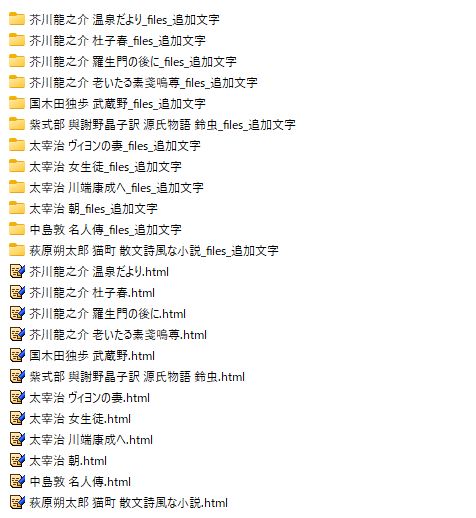
指定したフォルダの直下にあるすべてのフォルダの名前の末尾に、指定した文字列を追加する。

【処理結果例】
【Pythonプログラムコード】
import os
import tkinter as tk
from tkinter import filedialog, messagebox

def rename_folders():
    target_dir = entry_path.get().strip('"') # 引用符がついている場合を除去
    suffix = entry_suffix.get()

    if not target_dir or not os.path.isdir(target_dir):
        messagebox.showerror("エラー", "有効な対象フォルダを選択してください。")
        return
    if not suffix:
        messagebox.showwarning("警告", "追加する文字列を入力してください。")
        return

    try:
        count = 0
        for item in os.listdir(target_dir):
            item_path = os.path.join(target_dir, item)
            if os.path.isdir(item_path):
                new_name = item + suffix
                new_path = os.path.join(target_dir, new_name)

                if not os.path.exists(new_path):
                    os.rename(item_path, new_path)
                    count += 1
        messagebox.showinfo("完了", f"{count} 個のフォルダ名を変更しました。")
    except Exception as e:
        messagebox.showerror("エラー", f"予期せぬエラーが発生しました:\n{e}")

def select_folder():
    # 入力欄から現在のパスを取得
    current_path = entry_path.get().strip('"')

    # パスが有効ならそのフォルダを、無効ならNone(標準)を初期ディレクトリにする
    initial_dir = current_path if os.path.isdir(current_path) else None

    selected = filedialog.askdirectory(initialdir=initial_dir)
    if selected:
        # 入力欄をクリアして新しいパスを挿入
        entry_path.delete(0, tk.END)
        entry_path.insert(0, selected.replace('/', '\\')) # Windows風の区切りに統一

# --- GUIの構築 ---
root = tk.Tk()
root.title("フォルダ名一括追加ツール")
root.geometry("550x250")

label1 = tk.Label(root, text="対象の親フォルダ (手入力可):")
label1.pack(pady=(15, 0))

frame_path = tk.Frame(root)
frame_path.pack(fill="x", padx=20)

entry_path = tk.Entry(frame_path)
entry_path.pack(side="left", fill="x", expand=True, padx=(0, 5))

btn_browse = tk.Button(frame_path, text="参照", command=select_folder)
btn_browse.pack(side="right")

label2 = tk.Label(root, text="フォルダ名に追加する文字列:")
label2.pack(pady=(15, 0))
entry_suffix = tk.Entry(root, width=30)
entry_suffix.pack(pady=5)
entry_suffix.insert(0, "_追加文字")

btn_execute = tk.Button(root, text="処理を実行する", command=rename_folders,
                       bg="#4CAF50", fg="white", font=("MS Gothic", 10, "bold"),
                       padx=20, pady=10)
btn_execute.pack(pady=20)

root.mainloop()