Claude)Python)写真を美肌に編集加工するWindowsアプリ作成(5)。毛穴やシミを目立たなくする。AI顔検出+AI輪郭抽出(精度向上版)。ICCプロファイル維持。
先日、写真を美肌に編集加工するWindowsアプリをPythonで作成した。

輪郭抽出枠が大雑把だったので、もう少し細かく輪郭を抽出できるバージョンを作成。
課題としては、輪郭抽出の処理時間が大幅に上がったことと、抽出できる範囲がまだ完璧とは言えない点。(※ この点は、今後も改善していきたい。)
追加機能として、輪郭抽出枠をマウスによる手動でも範囲追加、範囲削除できるようにした。顔検出していなくても、輪郭抽出枠の範囲追加、範囲削除が出来る。タブレットを使えば、顔の輪郭を忠実に囲むことが可能と思われる。
【使い方】
1. 画像の読み込み
「ファイル選択」ボタンから画像を選択
(ドラッグ&ドロップも可能)
2. 顔検出
「顔検出」ボタンで自動的に顔を検出
- 緑の枠で顔を囲む
- 枠をクリックで除外可能
- マウスドラッグで手動追加可能
3. 輪郭抽出
「輪郭抽出(時間かかる)」で肌領域を抽出
- AIが顔・首・肩まで自動検出
- 青い線で輪郭を表示
4. 輪郭編集
「範囲追加」「範囲削除」で輪郭を調整
- ボタンを押してマウスドラッグで範囲指定
- 連続して複数回範囲指定可能
- 輪郭抽出なしでも使用可能
- 独立した複数領域の追加も可能
- 美肌効果後も編集可能(自動再適用)
5. 美肌効果
「美肌効果」ボタンで肌を滑らかに
「美肌効果(範囲+)」で周辺も含む(今回のバージョンでは不要かも)
- スライダーで効果を調整(0-100)
- スライダー操作でリアルタイム更新
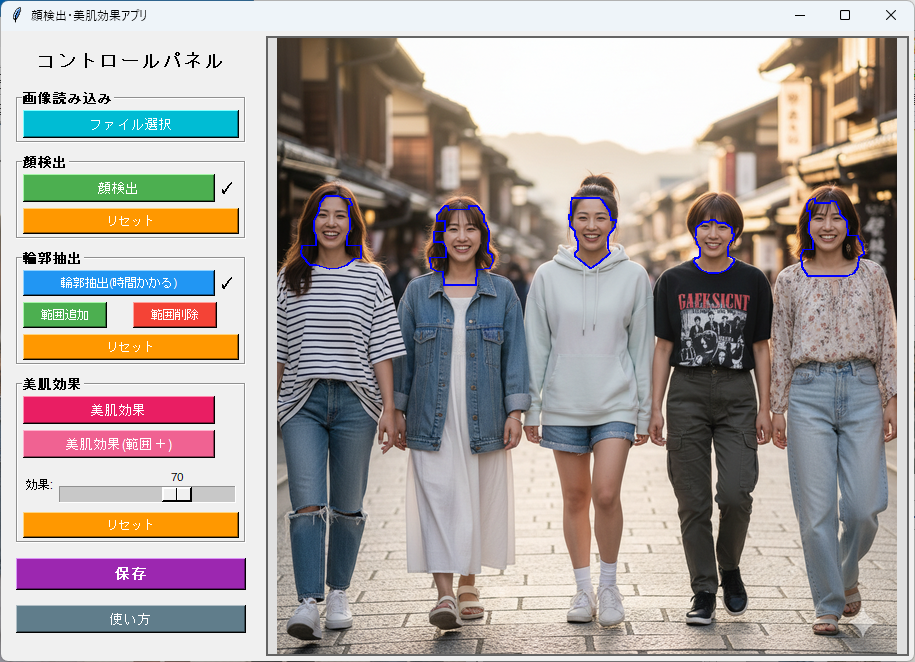
【プログラム画面サンプル】
≪ 顔検出 ≫

≪ 輪郭抽出:枠が顔の中に入り込むケースがある ≫
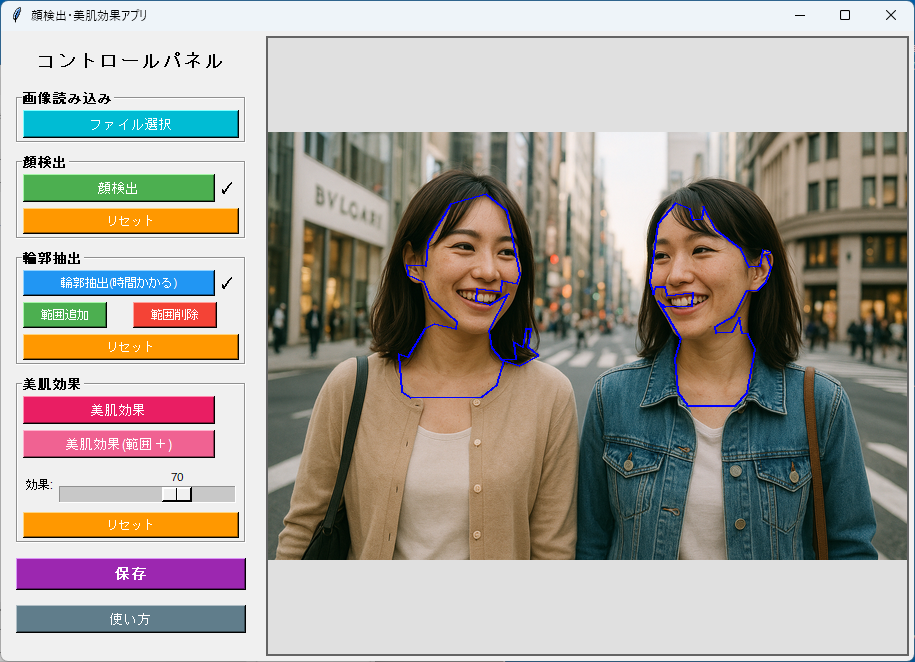
≪ 輪郭抽出:範囲追加をマウスで手動で行う ≫
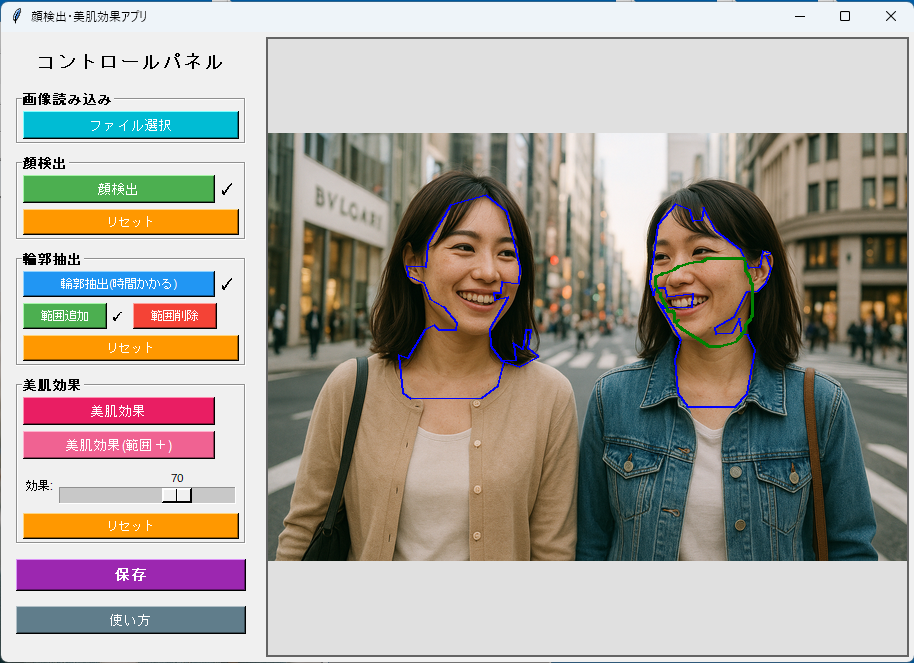
≪ 輪郭抽出:範囲削除をマウスで手動で行う ≫
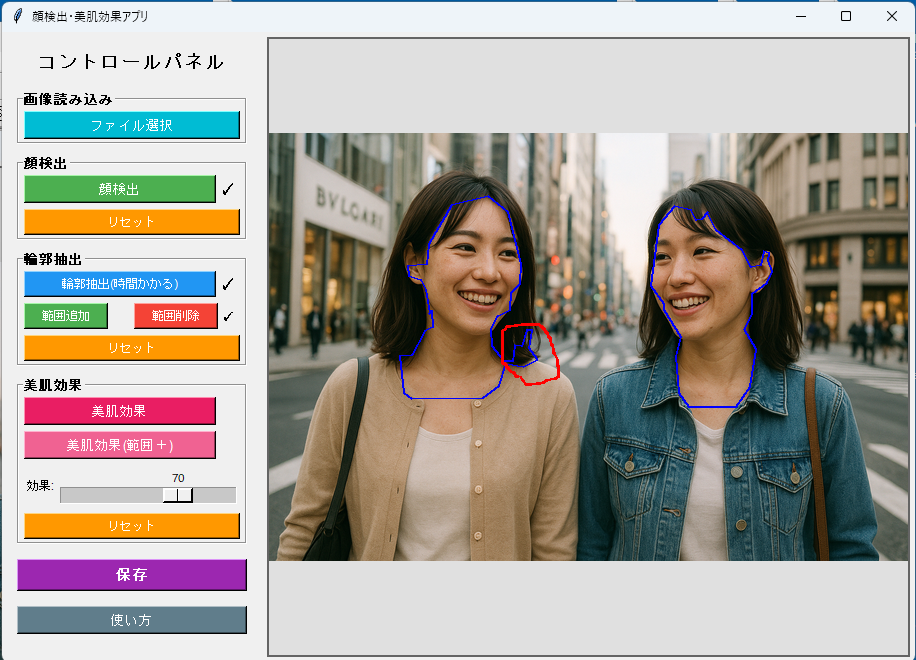
≪ 美肌効果適用 ≫

≪ 顔検出 ≫
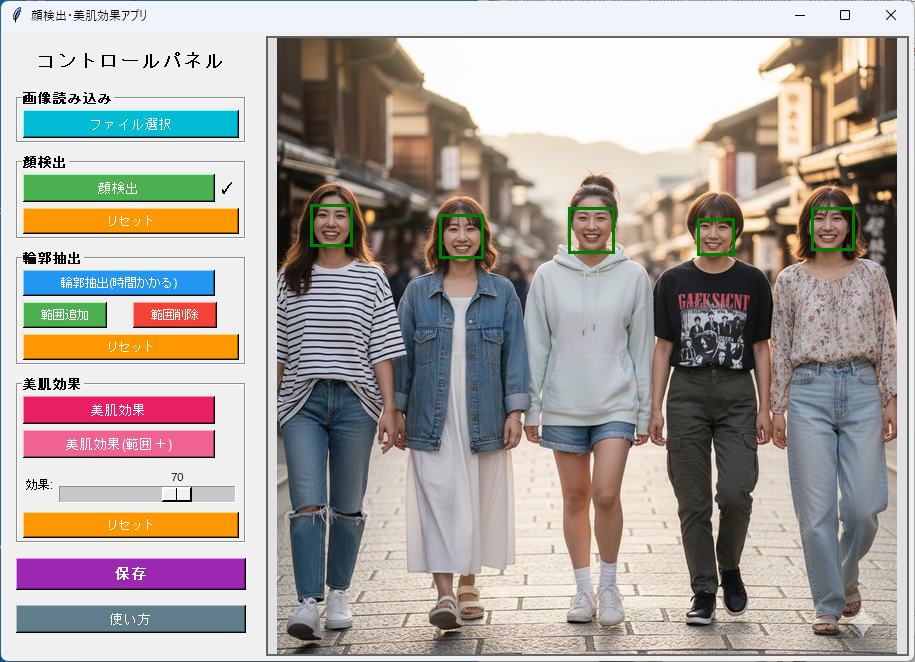
≪ 輪郭抽出:顔の面積が小さくても輪郭抽出できるようになった ≫
【Pythonライブラリインストール】
次のライブラリが必要なので、インストールする。
pip install opencv-python pillow mediapipe numpy tkinterdnd2
【Pythonプログラムコード】
※ 【後日追記】最初のバージョンでは、元の写真に埋め込まれたICCプロファイル(sRGB、Adobe RGB、Display P3など)が保存されていなかった。そのために、鮮やかさなどの色合いが失われていた。この点を修正した。
import tkinter as tk
from tkinter import ttk, filedialog, messagebox
from PIL import Image, ImageTk, ImageDraw, ImageFilter
import cv2
import numpy as np
import mediapipe as mp
import os
import sys
import io
class FaceBeautyApp:
def __init__(self, root):
self.root = root
self.root.title("顔検出・美肌効果アプリ")
self.root.geometry("1200x800")
# MediaPipe初期化
self.mp_face_detection = mp.solutions.face_detection
self.mp_face_mesh = mp.solutions.face_mesh
self.mp_selfie_segmentation = mp.solutions.selfie_segmentation
self.face_detection = self.mp_face_detection.FaceDetection(
model_selection=1, min_detection_confidence=0.5)
self.face_mesh = self.mp_face_mesh.FaceMesh(
static_image_mode=True, max_num_faces=10, min_detection_confidence=0.3)
self.selfie_segmentation = self.mp_selfie_segmentation.SelfieSegmentation(
model_selection=1)
# 変数初期化
self.original_image = None
self.current_image = None
self.display_image = None
self.photo = None
self.image_path = None
self.face_boxes = []
self.show_boxes = True
self.face_contours = []
self.beauty_applied = False
self.drag_start = None
self.temp_box = None
self.display_scale = 1.0
self.image_offset = (0, 0)
self.beauty_intensity_applied = 0
self.beauty_mode = 'normal'
self.icc_profile = None # ICCプロファイル保持用
# 処理状態フラグ
self.detect_done = False
self.contour_done = False
self.beauty_normal_done = False
self.beauty_plus_done = False
# 輪郭編集モード
self.contour_edit_mode = False
self.editing_contour_idx = None
self.edit_points = []
self.edit_mode_type = None
# tkinterdnd2の有効性チェック
self.dnd_available = False
self.setup_ui()
def setup_ui(self):
# メインフレーム
main_frame = tk.Frame(self.root)
main_frame.pack(fill=tk.BOTH, expand=True)
# 左側コントロールパネル
control_panel = tk.Frame(main_frame, width=250, bg='#f0f0f0')
control_panel.pack(side=tk.LEFT, fill=tk.Y, padx=5, pady=5)
control_panel.pack_propagate(False)
# タイトル
title_label = tk.Label(control_panel, text="コントロールパネル",
font=('Arial', 14, 'bold'), bg='#f0f0f0')
title_label.pack(pady=10)
# ファイル選択ボタン
file_frame = tk.LabelFrame(control_panel, text="画像読み込み", bg='#f0f0f0', font=('Arial', 10, 'bold'))
file_frame.pack(fill=tk.X, padx=10, pady=5)
self.load_btn = tk.Button(file_frame, text="ファイル選択", command=self.select_file,
bg='#00BCD4', fg='white', font=('Arial', 10))
self.load_btn.pack(fill=tk.X, padx=5, pady=3)
# 顔検出セクション
face_frame = tk.LabelFrame(control_panel, text="顔検出", bg='#f0f0f0', font=('Arial', 10, 'bold'))
face_frame.pack(fill=tk.X, padx=10, pady=5)
detect_btn_frame = tk.Frame(face_frame, bg='#f0f0f0')
detect_btn_frame.pack(fill=tk.X, padx=5, pady=3)
self.detect_btn = tk.Button(detect_btn_frame, text="顔検出", command=self.detect_faces,
bg='#4CAF50', fg='white', font=('Arial', 10))
self.detect_btn.pack(side=tk.LEFT, fill=tk.X, expand=True)
self.detect_check = tk.Label(detect_btn_frame, text="", bg='#f0f0f0', font=('Arial', 12), width=2)
self.detect_check.pack(side=tk.LEFT)
self.reset_detect_btn = tk.Button(face_frame, text="リセット", command=self.reset_detection,
bg='#ff9800', fg='white', font=('Arial', 9))
self.reset_detect_btn.pack(fill=tk.X, padx=5, pady=3)
# 輪郭抽出セクション
contour_frame = tk.LabelFrame(control_panel, text="輪郭抽出", bg='#f0f0f0', font=('Arial', 10, 'bold'))
contour_frame.pack(fill=tk.X, padx=10, pady=5)
contour_btn_frame = tk.Frame(contour_frame, bg='#f0f0f0')
contour_btn_frame.pack(fill=tk.X, padx=5, pady=3)
self.contour_btn = tk.Button(contour_btn_frame, text="輪郭抽出(時間かかる)", command=self.extract_contours,
bg='#2196F3', fg='white', font=('Arial', 9))
self.contour_btn.pack(side=tk.LEFT, fill=tk.X, expand=True)
self.contour_check = tk.Label(contour_btn_frame, text="", bg='#f0f0f0', font=('Arial', 12), width=2)
self.contour_check.pack(side=tk.LEFT)
# 輪郭編集ボタン
edit_frame = tk.Frame(contour_frame, bg='#f0f0f0')
edit_frame.pack(fill=tk.X, padx=5, pady=3)
edit_add_btn_frame = tk.Frame(edit_frame, bg='#f0f0f0')
edit_add_btn_frame.pack(side=tk.LEFT, fill=tk.X, expand=True, padx=(0, 2))
self.edit_add_btn = tk.Button(edit_add_btn_frame, text="範囲追加", command=self.toggle_edit_add,
bg='#4CAF50', fg='white', font=('Arial', 9))
self.edit_add_btn.pack(side=tk.LEFT, fill=tk.X, expand=True)
self.edit_add_check = tk.Label(edit_add_btn_frame, text="", bg='#f0f0f0', font=('Arial', 10), width=2)
self.edit_add_check.pack(side=tk.LEFT)
edit_remove_btn_frame = tk.Frame(edit_frame, bg='#f0f0f0')
edit_remove_btn_frame.pack(side=tk.LEFT, fill=tk.X, expand=True, padx=(2, 0))
self.edit_remove_btn = tk.Button(edit_remove_btn_frame, text="範囲削除", command=self.toggle_edit_remove,
bg='#f44336', fg='white', font=('Arial', 9))
self.edit_remove_btn.pack(side=tk.LEFT, fill=tk.X, expand=True)
self.edit_remove_check = tk.Label(edit_remove_btn_frame, text="", bg='#f0f0f0', font=('Arial', 10), width=2)
self.edit_remove_check.pack(side=tk.LEFT)
self.reset_contour_btn = tk.Button(contour_frame, text="リセット", command=self.reset_contours,
bg='#ff9800', fg='white', font=('Arial', 9))
self.reset_contour_btn.pack(fill=tk.X, padx=5, pady=3)
# 美肌効果セクション
beauty_frame = tk.LabelFrame(control_panel, text="美肌効果", bg='#f0f0f0', font=('Arial', 10, 'bold'))
beauty_frame.pack(fill=tk.X, padx=10, pady=5)
beauty_btn_frame = tk.Frame(beauty_frame, bg='#f0f0f0')
beauty_btn_frame.pack(fill=tk.X, padx=5, pady=3)
self.beauty_btn = tk.Button(beauty_btn_frame, text="美肌効果", command=self.apply_beauty,
bg='#E91E63', fg='white', font=('Arial', 10))
self.beauty_btn.pack(side=tk.LEFT, fill=tk.X, expand=True)
self.beauty_normal_check = tk.Label(beauty_btn_frame, text="", bg='#f0f0f0', font=('Arial', 12), width=2)
self.beauty_normal_check.pack(side=tk.LEFT)
beauty_plus_btn_frame = tk.Frame(beauty_frame, bg='#f0f0f0')
beauty_plus_btn_frame.pack(fill=tk.X, padx=5, pady=3)
self.beauty_plus_btn = tk.Button(beauty_plus_btn_frame, text="美肌効果(範囲+)", command=self.apply_beauty_plus,
bg='#F06292', fg='white', font=('Arial', 10))
self.beauty_plus_btn.pack(side=tk.LEFT, fill=tk.X, expand=True)
self.beauty_plus_check = tk.Label(beauty_plus_btn_frame, text="", bg='#f0f0f0', font=('Arial', 12), width=2)
self.beauty_plus_check.pack(side=tk.LEFT)
# 美肌スライダー
slider_frame = tk.Frame(beauty_frame, bg='#f0f0f0')
slider_frame.pack(fill=tk.X, padx=5, pady=3)
tk.Label(slider_frame, text="効果:", bg='#f0f0f0', font=('Arial', 9)).pack(side=tk.LEFT)
self.beauty_var = tk.IntVar(value=70)
self.beauty_slider = tk.Scale(slider_frame, from_=0, to=100, orient=tk.HORIZONTAL,
variable=self.beauty_var, bg='#f0f0f0',
command=self.on_slider_change)
self.beauty_slider.pack(side=tk.LEFT, fill=tk.X, expand=True)
self.reset_beauty_btn = tk.Button(beauty_frame, text="リセット", command=self.reset_beauty,
bg='#ff9800', fg='white', font=('Arial', 9))
self.reset_beauty_btn.pack(fill=tk.X, padx=5, pady=3)
# 保存ボタン
self.save_btn = tk.Button(control_panel, text="保存", command=self.save_image,
bg='#9C27B0', fg='white', font=('Arial', 11, 'bold'))
self.save_btn.pack(fill=tk.X, padx=10, pady=10)
# 使い方ボタン
self.help_btn = tk.Button(control_panel, text="使い方", command=self.show_help,
bg='#607D8B', fg='white', font=('Arial', 10))
self.help_btn.pack(fill=tk.X, padx=10, pady=5)
# 右側画像表示エリア
image_frame = tk.Frame(main_frame, bg='white')
image_frame.pack(side=tk.RIGHT, fill=tk.BOTH, expand=True, padx=5, pady=5)
# キャンバス
self.canvas = tk.Canvas(image_frame, bg='#e0e0e0', cursor='cross')
self.canvas.pack(fill=tk.BOTH, expand=True)
# ウィンドウサイズ変更イベント
self.canvas.bind('<Configure>', self.on_canvas_resize)
# ドラッグ&ドロップ設定
try:
self.canvas.drop_target_register('DND_Files')
self.canvas.dnd_bind('<<Drop>>', self.on_drop)
self.dnd_available = True
except:
pass
# マウスイベント
self.canvas.bind('<Button-1>', self.on_canvas_click)
self.canvas.bind('<B1-Motion>', self.on_canvas_drag)
self.canvas.bind('<ButtonRelease-1>', self.on_canvas_release)
# 初期メッセージ
msg = "ここに画像をドラッグ&ドロップ\nまたは「ファイル選択」ボタンをクリック" if self.dnd_available else "「ファイル選択」ボタンをクリック"
self.canvas.create_text(400, 300, text=msg,
font=('Arial', 14), fill='gray', tags='placeholder')
def on_canvas_resize(self, event):
if self.current_image is not None:
self.display_current_image()
def on_slider_change(self, value):
if self.beauty_applied and self.face_contours:
self.apply_beauty_effect()
def select_file(self):
file_path = filedialog.askopenfilename(
title="画像ファイルを選択",
filetypes=[
("画像ファイル", "*.jpg *.jpeg *.png *.bmp *.gif *.tif *.tiff"),
("すべてのファイル", "*.*")
]
)
if file_path:
self.load_image(file_path)
def on_drop(self, event):
files = self.root.tk.splitlist(event.data)
if files:
self.load_image(files[0])
def load_image(self, path):
try:
path = path.strip('{}').strip('"').strip("'")
# --- ICCプロファイル保持のためPILで読み込む ---
# PIL は日本語パスに対応しているが、念のためバイナリ読み込み経由
with open(path, 'rb') as f:
raw_bytes = f.read()
pil_img = Image.open(io.BytesIO(raw_bytes))
# ICCプロファイルを保存(存在しない場合はNone)
self.icc_profile = pil_img.info.get('icc_profile', None)
# RGBに統一(CMYK / グレースケール等にも対応)
if pil_img.mode != 'RGB':
pil_img = pil_img.convert('RGB')
self.original_image = np.array(pil_img)
if self.original_image is None or self.original_image.size == 0:
raise ValueError("画像を読み込めませんでした")
self.image_path = path
self.current_image = self.original_image.copy()
# リセット
self.face_boxes = []
self.face_contours = []
self.beauty_applied = False
self.show_boxes = True
self.beauty_intensity_applied = 0
self.contour_edit_mode = False
self.edit_mode_type = None
self.edit_points = []
# 状態フラグリセット
self.detect_done = False
self.contour_done = False
self.beauty_normal_done = False
self.beauty_plus_done = False
self.update_check_marks()
self.display_current_image()
except Exception as e:
messagebox.showerror("エラー", f"画像の読み込みに失敗しました:\n{str(e)}")
def display_current_image(self):
if self.current_image is None:
return
self.canvas.update_idletasks()
canvas_width = self.canvas.winfo_width()
canvas_height = self.canvas.winfo_height()
if canvas_width <= 1 or canvas_height <= 1:
canvas_width = 800
canvas_height = 600
img = Image.fromarray(self.current_image)
img_width, img_height = img.size
scale = min(canvas_width / img_width, canvas_height / img_height)
new_width = int(img_width * scale)
new_height = int(img_height * scale)
self.display_scale = scale
self.display_image = img.resize((new_width, new_height), Image.LANCZOS)
display_with_overlay = self.display_image.copy()
draw = ImageDraw.Draw(display_with_overlay)
if self.show_boxes and self.face_boxes:
for box in self.face_boxes:
x1, y1, x2, y2 = [int(coord * scale) for coord in box]
draw.rectangle([x1, y1, x2, y2], outline='green', width=3)
if self.face_contours:
for contour in self.face_contours:
scaled_contour = [(int(x * scale), int(y * scale)) for x, y in contour]
if len(scaled_contour) > 1:
draw.line(scaled_contour + [scaled_contour[0]], fill='blue', width=2)
if self.contour_edit_mode and self.edit_points:
scaled_edit = [(int(x * scale), int(y * scale)) for x, y in self.edit_points]
if len(scaled_edit) > 1:
color = 'green' if self.edit_mode_type == 'add' else 'red'
draw.line(scaled_edit, fill=color, width=3)
if self.temp_box:
x1, y1, x2, y2 = [int(coord * scale) for coord in self.temp_box]
draw.rectangle([x1, y1, x2, y2], outline='yellow', width=2)
self.photo = ImageTk.PhotoImage(display_with_overlay)
self.canvas.delete('all')
x = (canvas_width - new_width) // 2
y = (canvas_height - new_height) // 2
self.canvas.create_image(x, y, anchor=tk.NW, image=self.photo)
self.image_offset = (x, y)
def update_check_marks(self):
self.detect_check.config(text="✓" if self.detect_done else "")
self.contour_check.config(text="✓" if self.contour_done else "")
self.beauty_normal_check.config(text="✓" if self.beauty_normal_done else "")
self.beauty_plus_check.config(text="✓" if self.beauty_plus_done else "")
# 編集モードのチェックマーク
self.edit_add_check.config(text="✓" if self.edit_mode_type == 'add' else "")
self.edit_remove_check.config(text="✓" if self.edit_mode_type == 'remove' else "")
def detect_faces(self):
if self.original_image is None:
messagebox.showwarning("警告", "画像を読み込んでください")
return
# 輪郭抽出関連を全てリセット
self.face_contours = []
self.beauty_applied = False
self.current_image = self.original_image.copy()
self.contour_done = False
self.beauty_normal_done = False
self.beauty_plus_done = False
# 編集モードもリセット
self.contour_edit_mode = False
self.edit_mode_type = None
self.edit_points = []
try:
results = self.face_detection.process(self.original_image)
self.face_boxes = []
if results.detections:
h, w, _ = self.original_image.shape
for detection in results.detections:
bbox = detection.location_data.relative_bounding_box
x1 = int(bbox.xmin * w)
y1 = int(bbox.ymin * h)
x2 = int((bbox.xmin + bbox.width) * w)
y2 = int((bbox.ymin + bbox.height) * h)
x1, y1 = max(0, x1), max(0, y1)
x2, y2 = min(w, x2), min(h, y2)
self.face_boxes.append((x1, y1, x2, y2))
if not self.face_boxes:
messagebox.showwarning("検出失敗", "顔を検出できませんでした")
self.detect_done = False
else:
self.detect_done = True
self.show_boxes = True
self.update_check_marks()
self.display_current_image()
except Exception as e:
messagebox.showerror("エラー", f"顔検出に失敗しました:\n{str(e)}")
def reset_detection(self):
self.face_boxes = []
self.face_contours = []
self.beauty_applied = False
self.show_boxes = True
self.current_image = self.original_image.copy() if self.original_image is not None else None
self.detect_done = False
self.contour_done = False
self.beauty_normal_done = False
self.beauty_plus_done = False
self.contour_edit_mode = False
self.edit_mode_type = None
self.update_check_marks()
self.display_current_image()
def extract_contours(self):
if not self.face_boxes:
messagebox.showwarning("警告", "先に顔検出を実行してください")
return
self.beauty_applied = False
self.current_image = self.original_image.copy()
self.beauty_normal_done = False
self.beauty_plus_done = False
try:
h, w, _ = self.original_image.shape
img_bgr = cv2.cvtColor(self.original_image, cv2.COLOR_RGB2BGR)
self.face_contours = []
for box in self.face_boxes:
x1, y1, x2, y2 = box
box_height = y2 - y1
box_width = x2 - x1
# 拡張範囲
expanded_y1 = max(0, y1 - int(box_height * 0.2))
expanded_y2 = min(h, y2 + int(box_height * 0.6))
expanded_x1 = max(0, x1 - int(box_width * 0.25))
expanded_x2 = min(w, x2 + int(box_width * 0.25))
# GrabCutで前景抽出
mask = np.zeros((h, w), np.uint8)
bgd_model = np.zeros((1, 65), np.float64)
fgd_model = np.zeros((1, 65), np.float64)
rect = (expanded_x1, expanded_y1,
expanded_x2 - expanded_x1,
expanded_y2 - expanded_y1)
cv2.grabCut(img_bgr, mask, rect, bgd_model, fgd_model, 5, cv2.GC_INIT_WITH_RECT)
mask2 = np.where((mask == 2) | (mask == 0), 0, 1).astype('uint8')
# 拡大領域のマスクのみ使用
roi_mask = np.zeros_like(mask2)
roi_mask[expanded_y1:expanded_y2, expanded_x1:expanded_x2] = \
mask2[expanded_y1:expanded_y2, expanded_x1:expanded_x2]
# 領域別に異なる肌色検出を適用
# 上部(顔・髪境界):厳しい検出
# 下部(首):緩い検出
# YCrCbカラースペースでの肌色検出
img_ycrcb = cv2.cvtColor(self.original_image, cv2.COLOR_RGB2YCrCb)
# 厳しい肌色検出(頭部用)
lower_skin_strict = np.array([0, 135, 85], dtype=np.uint8)
upper_skin_strict = np.array([255, 170, 120], dtype=np.uint8)
skin_mask_strict = cv2.inRange(img_ycrcb, lower_skin_strict, upper_skin_strict)
# 緩い肌色検出(首・体用)
lower_skin_loose = np.array([0, 130, 75], dtype=np.uint8)
upper_skin_loose = np.array([255, 175, 130], dtype=np.uint8)
skin_mask_loose = cv2.inRange(img_ycrcb, lower_skin_loose, upper_skin_loose)
# HSVでの補助的な肌色検出
img_hsv = cv2.cvtColor(self.original_image, cv2.COLOR_RGB2HSV)
lower_skin_hsv = np.array([0, 20, 70], dtype=np.uint8)
upper_skin_hsv = np.array([25, 160, 255], dtype=np.uint8)
skin_mask_hsv = cv2.inRange(img_hsv, lower_skin_hsv, upper_skin_hsv)
# 明度による髪の除外(頭部のみ)
gray = cv2.cvtColor(self.original_image, cv2.COLOR_RGB2GRAY)
_, brightness_mask = cv2.threshold(gray, 50, 255, cv2.THRESH_BINARY)
# 領域別マスク作成
region_mask = np.zeros((h, w), dtype=np.uint8)
# 顔の上半分(髪が多い領域):厳しい条件
upper_region_y = y2 # 顔検出枠の下端まで
upper_mask = np.zeros((h, w), dtype=np.uint8)
upper_mask[expanded_y1:upper_region_y, expanded_x1:expanded_x2] = 255
# 厳しい条件(AND条件)
strict_result = cv2.bitwise_and(skin_mask_strict, skin_mask_hsv)
strict_result = cv2.bitwise_and(strict_result, brightness_mask)
strict_result = cv2.bitwise_and(strict_result, upper_mask)
# 顔の下半分から首(肌が多い領域):緩い条件
lower_mask = np.zeros((h, w), dtype=np.uint8)
lower_mask[upper_region_y:expanded_y2, expanded_x1:expanded_x2] = 255
# 緩い条件(OR条件を含む)
loose_result = cv2.bitwise_or(skin_mask_loose, skin_mask_hsv)
loose_result = cv2.bitwise_and(loose_result, lower_mask)
# 2つの領域を統合
region_mask = cv2.bitwise_or(strict_result, loose_result)
# GrabCutの結果と組み合わせる
roi_mask = cv2.bitwise_and(roi_mask, region_mask)
# ノイズ除去(段階的に)
kernel_small = np.ones((3, 3), np.uint8)
roi_mask = cv2.morphologyEx(roi_mask, cv2.MORPH_OPEN, kernel_small, iterations=1)
# 穴埋め
kernel_medium = np.ones((9, 9), np.uint8)
roi_mask = cv2.morphologyEx(roi_mask, cv2.MORPH_CLOSE, kernel_medium, iterations=2)
# さらに滑らかに
kernel_large = np.ones((13, 13), np.uint8)
roi_mask = cv2.morphologyEx(roi_mask, cv2.MORPH_CLOSE, kernel_large, iterations=1)
# 輪郭を検出
contours, _ = cv2.findContours(roi_mask, cv2.RETR_EXTERNAL, cv2.CHAIN_APPROX_SIMPLE)
if contours:
# 面積でフィルタリング
valid_contours = [cnt for cnt in contours if cv2.contourArea(cnt) > (box_width * box_height) * 0.15]
if not valid_contours:
continue
# 最大の輪郭を選択
largest_contour = max(valid_contours, key=cv2.contourArea)
# 面積チェック
area = cv2.contourArea(largest_contour)
min_area = (box_width * box_height) * 0.2
if area < min_area:
continue
# 輪郭を滑らかに(凸包は使わない - 首のラインを保持)
epsilon = 0.004 * cv2.arcLength(largest_contour, True)
smoothed_contour = cv2.approxPolyDP(largest_contour, epsilon, True)
# 座標を変換
adjusted_contour = []
for point in smoothed_contour:
x = int(point[0][0])
y = int(point[0][1])
adjusted_contour.append((x, y))
# 点数を調整
if len(adjusted_contour) > 150:
step = max(1, len(adjusted_contour) // 150)
adjusted_contour = adjusted_contour[::step]
if len(adjusted_contour) > 10:
self.face_contours.append(adjusted_contour)
if not self.face_contours:
messagebox.showwarning("抽出失敗", "輪郭を抽出できませんでした")
self.contour_done = False
self.show_boxes = True
else:
self.contour_done = True
self.show_boxes = False
self.update_check_marks()
self.display_current_image()
except Exception as e:
messagebox.showerror("エラー", f"輪郭抽出に失敗しました:\n{str(e)}")
def toggle_edit_add(self):
"""範囲追加モードのトグル"""
if self.original_image is None:
messagebox.showwarning("警告", "画像を読み込んでください")
return
# 輪郭がない場合は空のリストで開始
if not self.face_contours:
self.face_contours = []
# 範囲追加モードの場合は継続、そうでない場合は開始
if self.edit_mode_type == 'add':
# 既に追加モードの場合は何もしない(継続)
pass
else:
# 編集モードを追加に変更
self.contour_edit_mode = True
self.edit_mode_type = 'add'
self.edit_points = []
# 顔検出枠を非表示
self.show_boxes = False
self.update_check_marks()
self.display_current_image()
def toggle_edit_remove(self):
"""範囲削除モードのトグル"""
if self.original_image is None:
messagebox.showwarning("警告", "画像を読み込んでください")
return
# 輪郭がない場合は空のリストで開始
if not self.face_contours:
self.face_contours = []
# 範囲削除モードの場合は継続、そうでない場合は開始
if self.edit_mode_type == 'remove':
# 既に削除モードの場合は何もしない(継続)
pass
else:
# 編集モードを削除に変更
self.contour_edit_mode = True
self.edit_mode_type = 'remove'
self.edit_points = []
# 顔検出枠を非表示
self.show_boxes = False
self.update_check_marks()
self.display_current_image()
def apply_contour_edit(self):
"""マウスで描いた範囲に基づいて輪郭を編集"""
if not self.edit_points or len(self.edit_points) < 3:
return
h, w = self.original_image.shape[:2]
edit_mask = np.zeros((h, w), dtype=np.uint8)
edit_polygon = np.array(self.edit_points, dtype=np.int32)
cv2.fillPoly(edit_mask, [edit_polygon], 255)
if not self.face_contours or len(self.face_contours) == 0:
# 輪郭が存在しない場合、新規作成
if self.edit_mode_type == 'add':
contours, _ = cv2.findContours(edit_mask, cv2.RETR_EXTERNAL, cv2.CHAIN_APPROX_SIMPLE)
if contours:
largest = max(contours, key=cv2.contourArea)
epsilon = 0.003 * cv2.arcLength(largest, True)
smoothed = cv2.approxPolyDP(largest, epsilon, True)
new_contour = [(int(point[0][0]), int(point[0][1])) for point in smoothed]
if len(new_contour) > 10:
self.face_contours = [new_contour]
else:
# 既存の輪郭を編集
if self.edit_mode_type == 'add':
# 追加モード:既存の輪郭とマージするか、新規領域として追加
# すべての輪郭を統合したマスクを作成
combined_mask = np.zeros((h, w), dtype=np.uint8)
for contour in self.face_contours:
contour_array = np.array(contour, dtype=np.int32)
cv2.fillPoly(combined_mask, [contour_array], 255)
# 編集マスクと統合
combined_mask = cv2.bitwise_or(combined_mask, edit_mask)
# ノイズ除去
kernel = np.ones((3, 3), np.uint8)
combined_mask = cv2.morphologyEx(combined_mask, cv2.MORPH_CLOSE, kernel)
combined_mask = cv2.morphologyEx(combined_mask, cv2.MORPH_OPEN, kernel)
# 新しい輪郭を抽出(複数の独立した領域を保持)
contours, _ = cv2.findContours(combined_mask, cv2.RETR_EXTERNAL, cv2.CHAIN_APPROX_SIMPLE)
new_contours = []
if contours:
for cnt in contours:
if cv2.contourArea(cnt) > 100: # 最小面積フィルタ
epsilon = 0.003 * cv2.arcLength(cnt, True)
smoothed = cv2.approxPolyDP(cnt, epsilon, True)
new_contour = [(int(point[0][0]), int(point[0][1])) for point in smoothed]
if len(new_contour) > 10:
new_contours.append(new_contour)
if new_contours:
self.face_contours = new_contours
else:
# 削除モード:各輪郭から削除
new_contours = []
for contour in self.face_contours:
contour_mask = np.zeros((h, w), dtype=np.uint8)
contour_array = np.array(contour, dtype=np.int32)
cv2.fillPoly(contour_mask, [contour_array], 255)
# マスクから削除
combined_mask = cv2.bitwise_and(contour_mask, cv2.bitwise_not(edit_mask))
# ノイズ除去
kernel = np.ones((3, 3), np.uint8)
combined_mask = cv2.morphologyEx(combined_mask, cv2.MORPH_CLOSE, kernel)
combined_mask = cv2.morphologyEx(combined_mask, cv2.MORPH_OPEN, kernel)
# 新しい輪郭を抽出
contours, _ = cv2.findContours(combined_mask, cv2.RETR_EXTERNAL, cv2.CHAIN_APPROX_SIMPLE)
if contours:
for cnt in contours:
if cv2.contourArea(cnt) > 100:
epsilon = 0.003 * cv2.arcLength(cnt, True)
smoothed = cv2.approxPolyDP(cnt, epsilon, True)
new_contour = [(int(point[0][0]), int(point[0][1])) for point in smoothed]
if len(new_contour) > 10:
new_contours.append(new_contour)
if new_contours:
self.face_contours = new_contours
# 美肌効果が適用されている場合は再適用
if self.beauty_applied:
self.apply_beauty_effect()
def reset_contours(self):
self.face_contours = []
self.beauty_applied = False
self.show_boxes = True
self.current_image = self.original_image.copy() if self.original_image is not None else None
self.contour_done = False
self.beauty_normal_done = False
self.beauty_plus_done = False
self.contour_edit_mode = False
self.edit_mode_type = None
self.update_check_marks()
self.display_current_image()
def apply_beauty(self):
if not self.face_contours and not self.face_boxes:
messagebox.showwarning("警告", "先に顔検出を実行してください")
return
self.beauty_applied = True
self.beauty_mode = 'normal'
self.beauty_normal_done = True
self.beauty_plus_done = False
self.update_check_marks()
self.apply_beauty_effect()
def apply_beauty_plus(self):
if not self.face_contours and not self.face_boxes:
messagebox.showwarning("警告", "先に顔検出を実行してください")
return
self.beauty_applied = True
self.beauty_mode = 'plus'
self.beauty_plus_done = True
self.beauty_normal_done = False
self.update_check_marks()
self.apply_beauty_effect()
def apply_beauty_effect(self):
if not self.face_contours and not self.face_boxes:
return
try:
intensity = self.beauty_var.get() / 100.0
result = self.original_image.copy()
h, w = result.shape[:2]
if self.face_contours:
contours_to_process = self.face_contours
else:
contours_to_process = []
for box in self.face_boxes:
x1, y1, x2, y2 = box
center_x = (x1 + x2) // 2
center_y = (y1 + y2) // 2
width = x2 - x1
height = y2 - y1
ellipse_contour = []
for angle in range(0, 360, 5):
rad = np.radians(angle)
x = int(center_x + (width / 2) * np.cos(rad))
y = int(center_y + (height / 2) * np.sin(rad))
ellipse_contour.append((x, y))
contours_to_process.append(ellipse_contour)
for contour in contours_to_process:
pts = np.array(contour, dtype=np.int32)
if self.beauty_mode == 'plus':
min_y = np.min(pts[:, 1])
max_y = np.max(pts[:, 1])
min_x = np.min(pts[:, 0])
max_x = np.max(pts[:, 0])
face_height = max_y - min_y
face_width = max_x - min_x
forehead_extend = int(face_height * 0.4)
neck_extend = int(face_height * 0.3)
side_extend = int(face_width * 0.1)
extended_contour = []
for x, y in contour:
if y < min_y + face_height * 0.3:
new_y = y - forehead_extend * (1 - (y - min_y) / (face_height * 0.3))
elif y > max_y - face_height * 0.2:
ratio = (y - (max_y - face_height * 0.2)) / (face_height * 0.2)
new_y = y + neck_extend * ratio
else:
new_y = y
if x < min_x + face_width * 0.3:
new_x = x - side_extend * (1 - (x - min_x) / (face_width * 0.3))
elif x > max_x - face_width * 0.3:
new_x = x + side_extend * ((x - (max_x - face_width * 0.3)) / (face_width * 0.3))
else:
new_x = x
extended_contour.append((int(new_x), int(new_y)))
pts = np.array(extended_contour, dtype=np.int32)
mask = np.zeros(result.shape[:2], dtype=np.uint8)
cv2.fillPoly(mask, [pts], 255)
blur_size = 25 if self.beauty_mode == 'plus' else 15
mask = cv2.GaussianBlur(mask, (blur_size, blur_size), 0)
kernel_size = max(5, int(5 + 10 * intensity))
if kernel_size % 2 == 0:
kernel_size += 1
smoothed = cv2.bilateralFilter(result, kernel_size, 30 + 30 * intensity, 30 + 30 * intensity)
brightness = cv2.convertScaleAbs(smoothed, alpha=1.0, beta=int(5 * intensity))
mask_float = mask.astype(float) / 255.0 * intensity
mask_3ch = np.stack([mask_float] * 3, axis=2)
result = (result * (1 - mask_3ch) + brightness * mask_3ch).astype(np.uint8)
self.current_image = result
self.beauty_intensity_applied = self.beauty_var.get()
self.display_current_image()
except Exception as e:
messagebox.showerror("エラー", f"美肌効果の適用に失敗しました:\n{str(e)}")
def reset_beauty(self):
if self.original_image is not None:
self.current_image = self.original_image.copy()
self.beauty_applied = False
self.beauty_normal_done = False
self.beauty_plus_done = False
self.update_check_marks()
self.display_current_image()
def save_image(self):
if self.current_image is None:
messagebox.showwarning("警告", "保存する画像がありません")
return
# 変数の初期化
init_dir = os.path.expanduser("~")
beauty_value = self.beauty_var.get()
# 処理状況に基づくファイル名の構成要素を決定
prefix = "輪郭" if self.contour_done else "顔"
mode_suffix = "beauty+" if self.beauty_mode == 'plus' else "beauty"
if self.image_path:
init_dir = os.path.dirname(self.image_path)
base_name_no_ext = os.path.splitext(os.path.basename(self.image_path))[0]
ext = os.path.splitext(self.image_path)[1].lower() # 拡張子を取得し小文字化
# 1. 元のファイル名ロジックを再現(拡張子は一時的に含める)
try:
# 拡張子を含んだ初期ファイル名(ロジック用)
temp_initial_file = f"{base_name_no_ext}_{prefix}{mode_suffix}{beauty_value}{ext}"
except:
temp_initial_file = f"{base_name_no_ext}_{prefix}{mode_suffix}{beauty_value}.png"
ext = '.png'
# 2. 拡張子とファイルタイプの優先順位を決定
if ext in ('.jpg', '.jpeg'):
default_ext = '.jpg'
filetypes_list = [("JPEG画像", "*.jpg"), ("PNG画像", "*.png"), ("すべてのファイル", "*.*")]
elif ext == '.png':
default_ext = '.png'
filetypes_list = [("PNG画像", "*.png"), ("JPEG画像", "*.jpg"), ("すべてのファイル", "*.*")]
else:
default_ext = '.png'
filetypes_list = [("PNG画像", "*.png"), ("JPEG画像", "*.jpg"), ("すべてのファイル", "*.*")]
# 3. initialfile には拡張子を**除去**したファイル名を渡す(ダイアログの初期選択問題を解決するため)
# ただし、元ロジックの「輪郭/顔」「beautyモード」「数値」は反映させる
initial_filename_no_ext = os.path.splitext(temp_initial_file)[0]
else:
# 画像がロードされていない場合のデフォルト
default_ext = ".jpg" # 元ロジックに合わせて.jpgをデフォルトに
initial_filename_no_ext = f"編集済み_{prefix}{mode_suffix}{beauty_value}"
filetypes_list = [("JPEG画像", "*.jpg"), ("PNG画像", "*.png"), ("すべてのファイル", "*.*")]
filepath = filedialog.asksaveasfilename(
initialdir=init_dir,
initialfile=initial_filename_no_ext, # 拡張子なしのファイル名を渡す
defaultextension=default_ext,
filetypes=filetypes_list
)
if filepath:
try:
# numpy配列 → PIL Image(RGB)
img_pil = Image.fromarray(self.current_image)
# ユーザーが選択した拡張子を確認
save_ext = os.path.splitext(filepath)[1].lower()
# ICCプロファイルを保存オプションに含める
save_kwargs = {}
if self.icc_profile:
save_kwargs['icc_profile'] = self.icc_profile
# 拡張子補完(拡張子なし or 不明な場合)
if save_ext not in ('.jpg', '.jpeg', '.png'):
if default_ext == '.jpg':
filepath += '.jpg'
save_ext = '.jpg'
else:
filepath += '.png'
save_ext = '.png'
# --- PIL で保存(日本語パス対応のため BytesIO 経由)---
buf = io.BytesIO()
if save_ext in ('.jpg', '.jpeg'):
img_pil.save(buf, format='JPEG', quality=95,
subsampling=0, **save_kwargs)
else:
img_pil.save(buf, format='PNG', **save_kwargs)
with open(filepath, 'wb') as f:
f.write(buf.getvalue())
except Exception as e:
messagebox.showerror("エラー", f"画像の保存に失敗しました:\n{str(e)}")
def show_help(self):
help_text = """【使い方】
1. 画像の読み込み
「ファイル選択」ボタンから画像を選択
(ドラッグ&ドロップも可能)
2. 顔検出
「顔検出」ボタンで自動的に顔を検出
- 緑の枠で顔を囲みます
- 枠をクリックで除外可能
- マウスドラッグで手動追加可能
3. 輪郭抽出
「輪郭抽出(時間かかる)」で肌領域を抽出
- AIが顔・首・肩まで自動検出
- 青い線で輪郭を表示
4. 輪郭編集
「範囲追加」「範囲削除」で輪郭を調整
- ボタンを押してマウスドラッグで範囲指定
- 連続して複数回範囲指定可能
- 輪郭抽出なしでも使用可能
- 独立した複数領域の追加も可能
- 美肌効果後も編集可能(自動再適用)
5. 美肌効果
「美肌効果」ボタンで肌を滑らかに
「美肌効果(範囲+)」で額・首も含む
- スライダーで効果を調整(0-100)
- スライダー操作でリアルタイム更新
6. 保存
「保存」ボタンで加工画像を保存
※各機能に「リセット」ボタンあり"""
messagebox.showinfo("使い方", help_text)
def on_canvas_click(self, event):
if self.original_image is None:
return
if self.contour_edit_mode:
x = (event.x - self.image_offset[0]) / self.display_scale
y = (event.y - self.image_offset[1]) / self.display_scale
self.edit_points = [(x, y)]
return
if self.face_boxes and self.show_boxes:
x = (event.x - self.image_offset[0]) / self.display_scale
y = (event.y - self.image_offset[1]) / self.display_scale
for i, box in enumerate(self.face_boxes):
x1, y1, x2, y2 = box
if x1 <= x <= x2 and y1 <= y <= y2:
self.face_boxes.pop(i)
self.display_current_image()
return
if not self.contour_edit_mode:
self.drag_start = (
(event.x - self.image_offset[0]) / self.display_scale,
(event.y - self.image_offset[1]) / self.display_scale
)
def on_canvas_drag(self, event):
if self.original_image is None:
return
if self.contour_edit_mode and self.edit_points:
x = (event.x - self.image_offset[0]) / self.display_scale
y = (event.y - self.image_offset[1]) / self.display_scale
self.edit_points.append((x, y))
self.display_current_image()
return
if self.drag_start and not self.contour_edit_mode:
x = (event.x - self.image_offset[0]) / self.display_scale
y = (event.y - self.image_offset[1]) / self.display_scale
x1, y1 = self.drag_start
self.temp_box = (min(x1, x), min(y1, y), max(x1, x), max(y1, y))
self.display_current_image()
def on_canvas_release(self, event):
if self.contour_edit_mode and self.edit_points:
self.apply_contour_edit()
self.edit_points = []
# 編集モードは継続(リセットしない)
self.display_current_image()
return
if self.drag_start and self.temp_box and not self.contour_edit_mode:
x1, y1, x2, y2 = self.temp_box
if abs(x2 - x1) > 20 and abs(y2 - y1) > 20:
self.face_boxes.append(self.temp_box)
self.drag_start = None
self.temp_box = None
self.display_current_image()
def main():
try:
from tkinterdnd2 import TkinterDnD
root = TkinterDnD.Tk()
except ImportError:
root = tk.Tk()
app = FaceBeautyApp(root)
root.mainloop()
if __name__ == "__main__":
main()
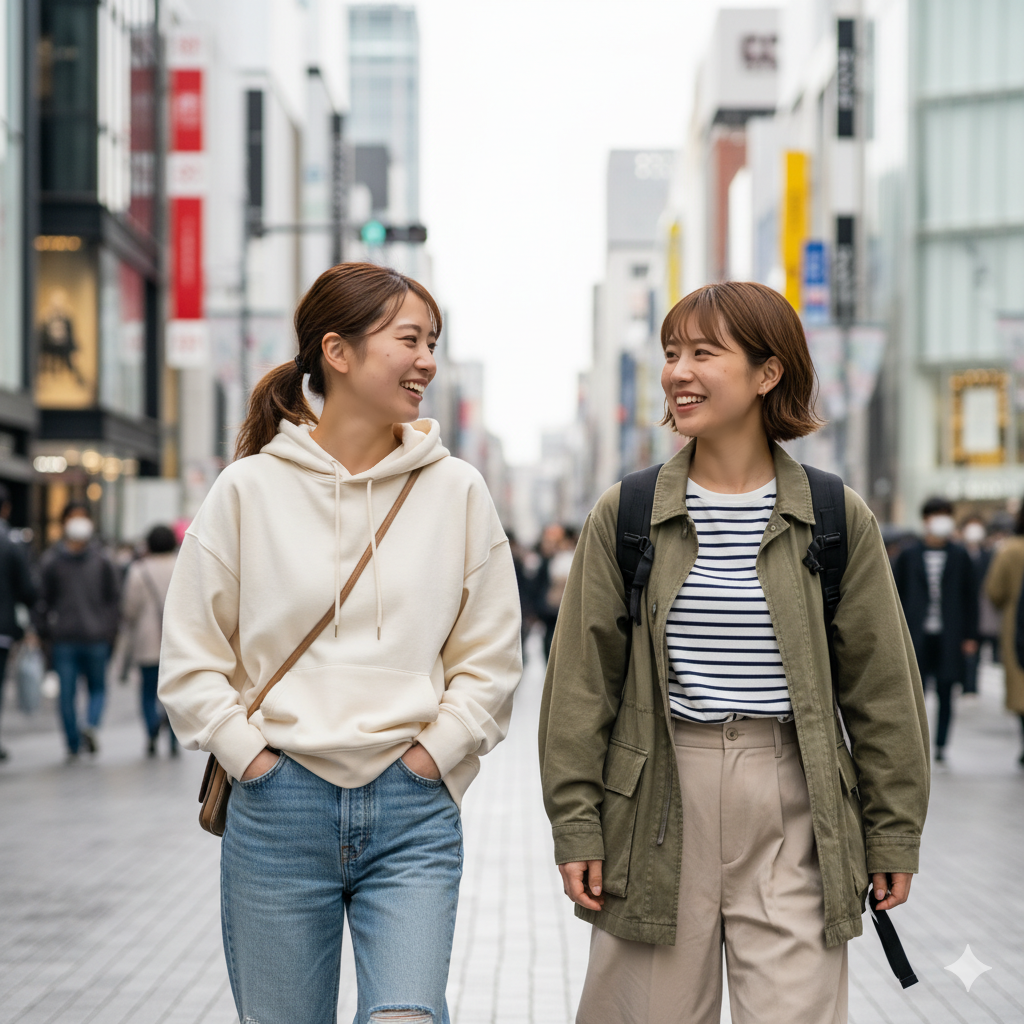
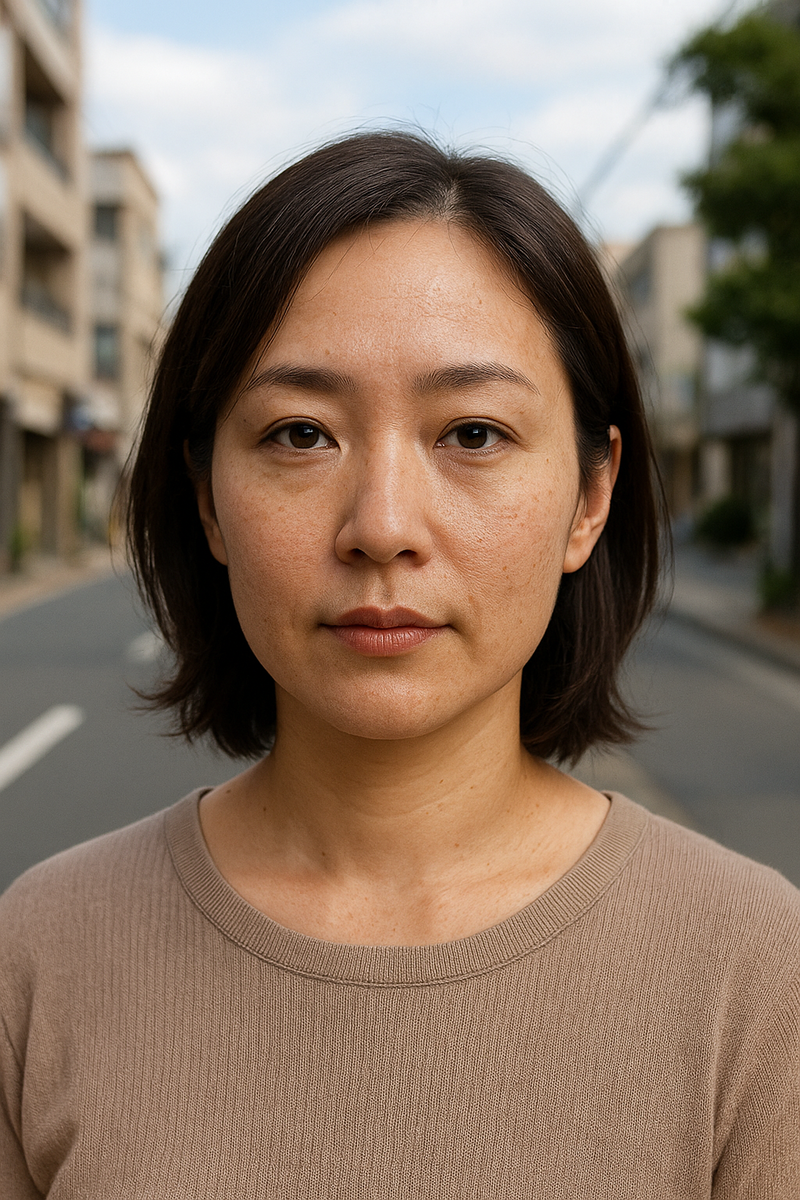
【サンプル画像】
※ オリジナル画像はAIで生成したもの。
≪ オリジナル画像 ≫
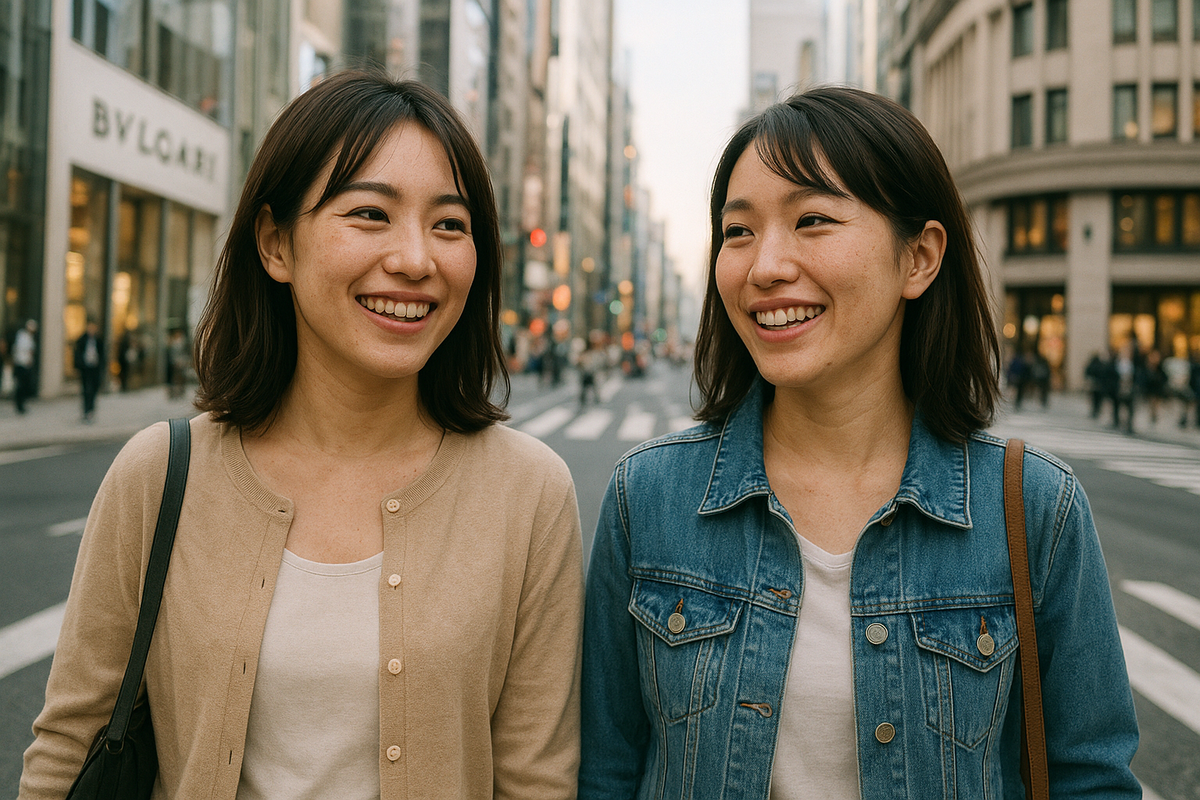
≪ 顔検出 → 輪郭抽出 → 美肌効果(70) ≫
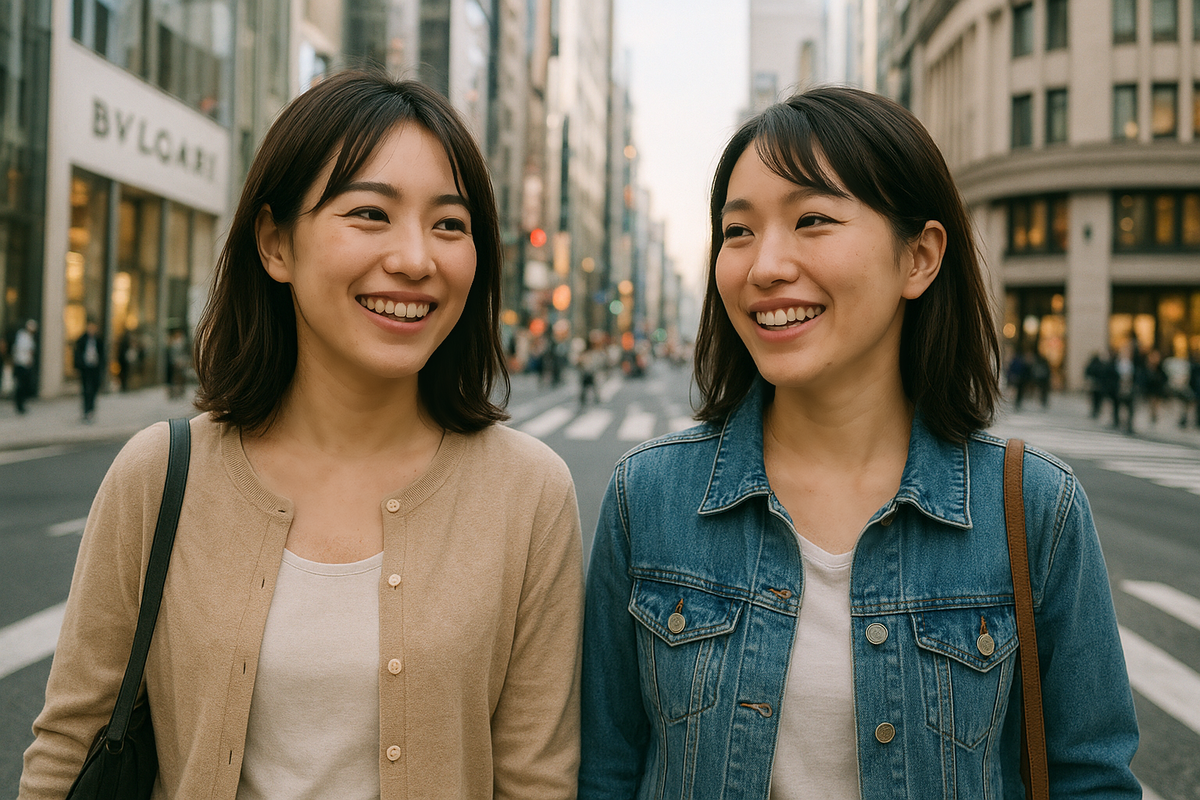
≪ オリジナル画像 ≫
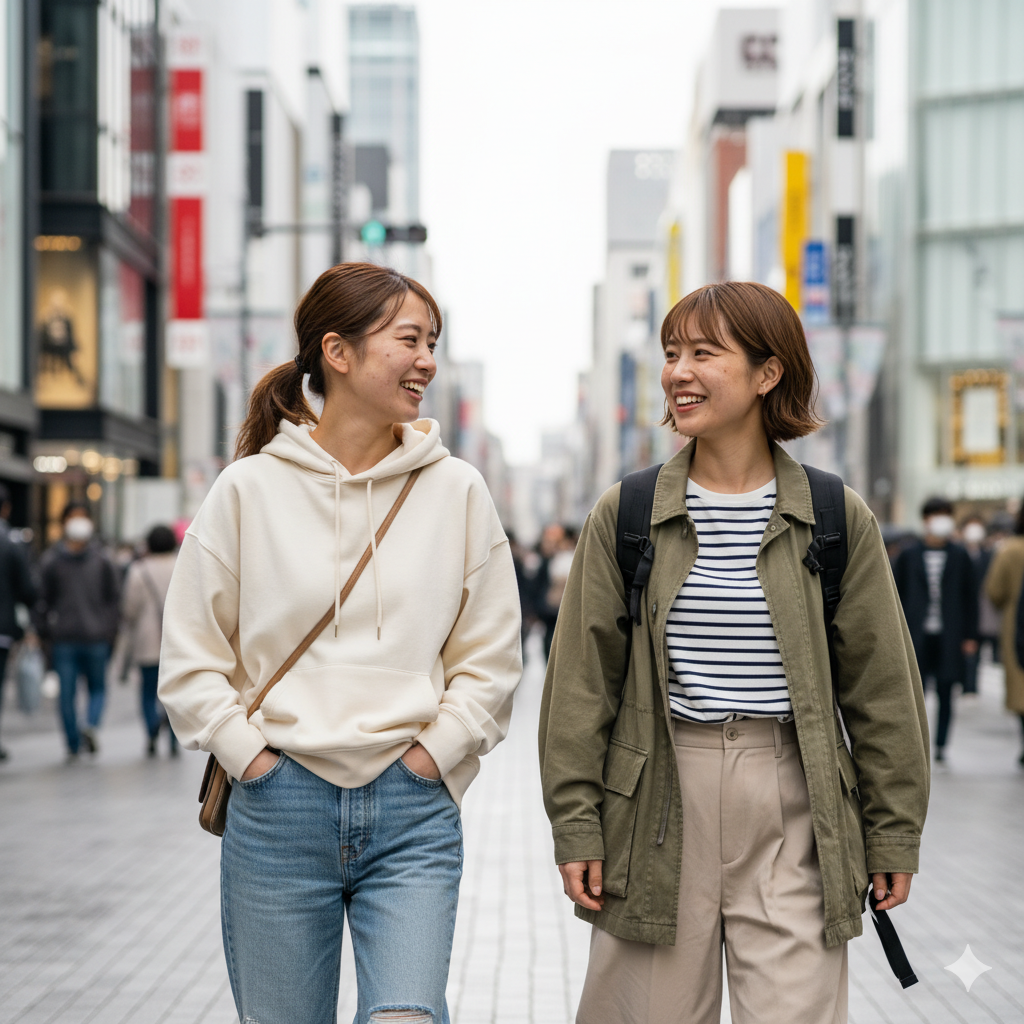
≪ 顔検出 → 輪郭抽出 → 美肌効果(70) ≫
≪ オリジナル画像 ≫
≪ 顔検出 → 輪郭抽出 → 美肌効果(70) ≫
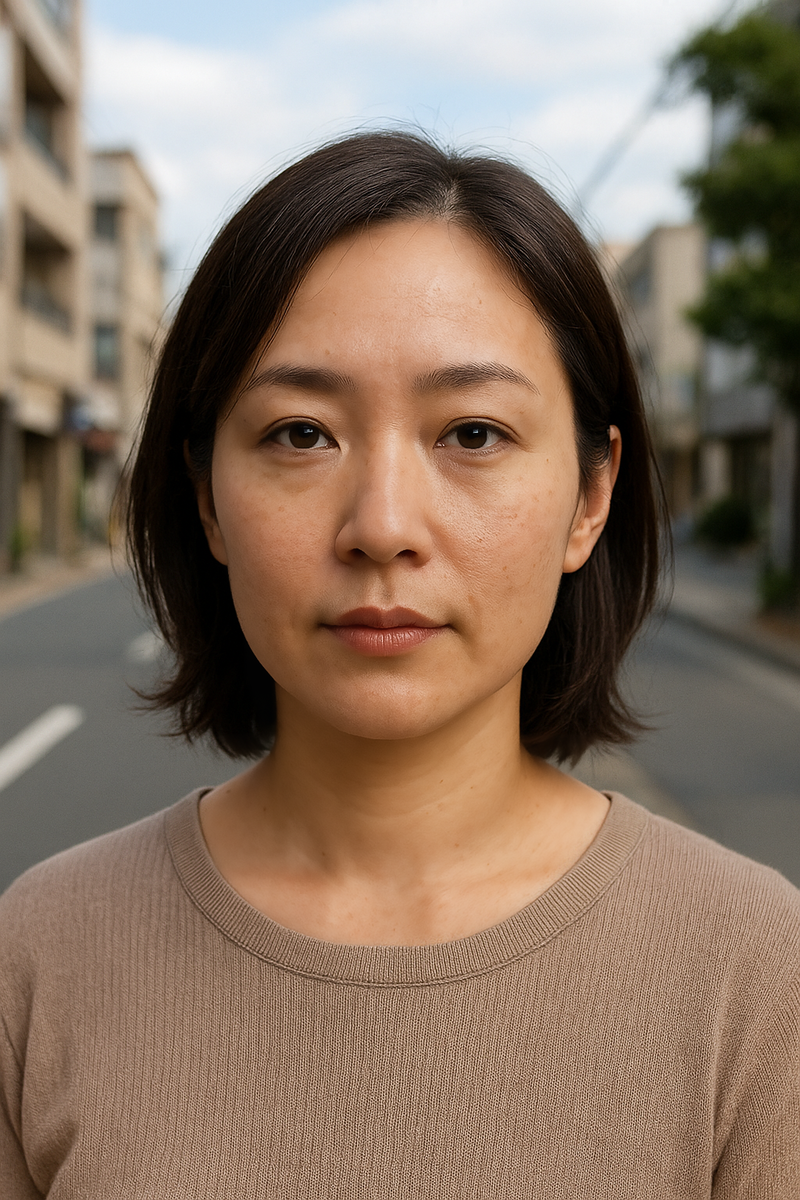
(↓)改善版。こちらがお勧め。


