HTML/JavaScriptカレンダーに「Holidays JP API 」で祝日表示。AIツールChatGPT、Copilotで作成。
先程、JavaScriptでシンプルなHTMLカレンダーを作成した。

これは、祝日表示対応していない。
これに、祝日表示を追加した。「Google Calendar API 」を使う方法もあるが、Google API KEYが必要だし、大晦日なども祝日扱いになってしまうので、問題がある。

ということで、今回、「Holidays JP API (日本の祝日API)」を使うことにした。
Holidays JP API (日本の祝日API)Holidays JP API は、日本の祝日一覧をJSONで返却するAPIです (CSV形式もサポート)holidays-jp.github.io

Googleカレンダーの情報を使っているらしいが、Google API KEYは不要で、JSON形式で祝日データを取得できる。JSONデータのURLは以下。
https://holidays-jp.github.io/api/v1/date.json
去年・今年・来年の3年分のデータが取得できる。
JSONデータは、GitHub Actionsにて定期的にビルドされて、内容は自動更新されるらしい。
【date.json サンプル】
{
    "2023-01-01": "元日",
    "2023-01-02": "休日 元日",
    "2023-01-09": "成人の日",
    "2023-02-11": "建国記念の日",
    "2023-02-23": "天皇誕生日",
    "2023-03-21": "春分の日",
    .....(省略).....
    "2025-09-15": "敬老の日",
    "2025-09-23": "秋分の日",
    "2025-10-13": "スポーツの日",
    "2025-11-03": "文化の日",
    "2025-11-23": "勤労感謝の日",
    "2025-11-24": "勤労感謝の日 振替休日"
}
先に作成したHTMLカレンダー
https://ok2nd.github.io/tool/calendar/month.html
に、上記JSONデータを使って祝日表示をするようにした。
AIツール「ChatGPT」と「Microsoft Copilot」でロジックを追加してもらった。基本のカレンダー部分のソースコードは「Microsoft Copilot」で作成したもの。
前月、翌月へのリンク機能も追加した。
CSSなど、デザインの細かい部分で手修正した。
https://ok2nd.github.io/tool/calendar/month-holidays-chatgpt.html
https://ok2nd.github.io/tool/calendar/month-holidays-chatgpt.html?y=2025&m=2
https://ok2nd.github.io/tool/calendar/month-holidays-copilot.html?y=2025&m=2

Copilot版をベースに、A4横印刷用も作成。
日付枠が4行、5行、6行で<td>の高さを変えるように調整。
https://ok2nd.github.io/tool/calendar/month-holidays-print.html?y=2025&m=2
≪ 印刷例 ≫

≪ ChatGPT版(印刷用でない)ソースコード :month-holidays-chatgpt.html≫
<!DOCTYPE html>
<html lang="ja">
<head>
<meta charset="UTF-8">
<title>カレンダー</title>
<style>
h2 {
	text-align: center;
}
.current-month {
	font-size: 2em;
}
table {
	border-collapse: collapse;
	width: 100%;
}
th, td {
	border: 1px solid #ddd;
	padding: 8px;
	text-align: center;
	width: 14%;
}
.sunday {
	color: red;
}
.saturday {
	color: blue;
}
.holiday {
	background-color: #fee;;
	color: red;
}
.holiday-name {
	font-size: 0.7em;
}
.prev-month, .next-month {
	color: #aaa;
}
nav a {
	text-decoration: none;
	font-size: 1em;
	margin: 0 10px;
	color: #00f;
}
</style>
</head>
<body>
<div id="calendar"></div>
<script>
async function fetchHolidays() {
	const response = await fetch('https://holidays-jp.github.io/api/v1/date.json');
	if (!response.ok) {
		console.error('Failed to fetch holiday data');
		return {};
	}
	return await response.json();
}
async function createCalendar(year, month) {
	document.title = 'カレンダー:' + year + '年' + (month+1) + '月'
	const holidays = await fetchHolidays();
	const calendarDiv = document.getElementById('calendar');
	calendarDiv.innerHTML = ''; // Clear previous calendar
	// Navigation for previous and next month
	const header = document.createElement('h2');
	const prevMonth = month === 0 ? 11 : month - 1;
	const nextMonth = month === 11 ? 0 : month + 1;
	const prevYear = month === 0 ? year - 1 : year;
	const nextYear = month === 11 ? year + 1 : year;
	header.innerHTML = `
		<nav>
			<a href="?y=${prevYear}&m=${prevMonth + 1}"><<</a>
			 ${year} <span class="current-month">${month + 1}</span> 月
			<a href="?y=${nextYear}&m=${nextMonth + 1}">>></a>
		</nav>
	`;
	calendarDiv.appendChild(header);
	const firstDay = new Date(year, month, 1);
	const lastDay = new Date(year, month + 1, 0);
	const prevLastDay = new Date(year, month, 0);
	const table = document.createElement('table');
	const headerRow = document.createElement('tr');
	const days = ['日', '月', '火', '水', '木', '金', '土'];
	for (const day of days) {
		const th = document.createElement('th');
		th.textContent = day;
		headerRow.appendChild(th);
	}
	table.appendChild(headerRow);
	let row = document.createElement('tr');
	for (let i = 0; i < firstDay.getDay(); i++) {
		const cell = document.createElement('td');
		cell.textContent = prevLastDay.getDate() - firstDay.getDay() + 1 + i;
		cell.classList.add('prev-month');
		row.appendChild(cell);
	}
	for (let date = 1; date <= lastDay.getDate(); date++) {
		const cell = document.createElement('td');
		const dayOfWeek = new Date(year, month, date).getDay();
		const dateString = `${year}-${String(month + 1).padStart(2, '0')}-${String(date).padStart(2, '0')}`;
		cell.textContent = date;
		// Add holiday class and name if the date is a holiday
		if (holidays[dateString]) {
			cell.classList.add('holiday');
			cell.innerHTML += `<br><span class="holiday-name">${holidays[dateString]}</span>`;
		}
		if (dayOfWeek === 0) {
			cell.classList.add('sunday');
		}
		if (dayOfWeek === 6) {
			cell.classList.add('saturday');
		}
		row.appendChild(cell);
		if (dayOfWeek === 6 || date === lastDay.getDate()) {
			table.appendChild(row);
			if (date !== lastDay.getDate()) {
				row = document.createElement('tr');
			}
		}
	}
	let nextDate = 1;
	while (row.childNodes.length < 7) {
		const cell = document.createElement('td');
		cell.textContent = nextDate;
		cell.classList.add('next-month');
		row.appendChild(cell);
		nextDate++;
	}
	if (row.childNodes.length > 0 && row.childNodes.length < 7) {
		table.appendChild(row);
	}
	calendarDiv.appendChild(table);
}
function getQueryParams() {
	const params = new URLSearchParams(window.location.search);
	return {
		year: params.get('y'),
		month: params.get('m')
	};
}
function init() {
	const { year, month } = getQueryParams();
	const today = new Date();
	const y = year ? parseInt(year) : today.getFullYear();
	const m = month ? parseInt(month) - 1 : today.getMonth();
	createCalendar(y, m);
}
document.addEventListener('DOMContentLoaded', init);
</script>
</body>
</html>
≪ Copilot版(印刷用でない)ソースコード:month-holidays-copilot.html ≫
<!DOCTYPE html>
<html lang="ja">
<head>
<meta charset="UTF-8">
<title>カレンダー</title>
<style>
h2 {
	text-align: center;
}
.current-month {
	font-size: 2em;
}
table {
	border-collapse: collapse;
	width: 100%;
}
th, td {
	border: 1px solid #ddd;
	padding: 8px;
	text-align: center;
	width: 14%;
}
.sunday {
	color: red;
}
.saturday {
	color: blue;
}
.prev-month, .next-month {
	color: #aaa;
}
.holiday {
	background-color: #fee;
	color: red;
}
.holiday-name {
	font-size: 0.7em;
}
.month-navigation {
	cursor: pointer;
	color: blue;
	text-decoration: none;
}
</style>
</head>
<body>
<div id="calendar"></div>
<script>
async function fetchHolidays() {
	const response = await fetch('https://holidays-jp.github.io/api/v1/date.json');
	const holidays = await response.json();
	return holidays;
}
function createCalendar(year, month) {
	return fetchHolidays().then(holidays => {
		document.title = 'カレンダー:' + year + '年' + (month+1) + '月'
		const calendarDiv = document.getElementById('calendar');
		calendarDiv.innerHTML = ''; // Clear previous calendar
		const header = document.createElement('h2');
		const prevMonth = new Date(year, month - 1);
		const nextMonth = new Date(year, month + 1);
		header.innerHTML = `
			<a class="month-navigation" href="?y=${prevMonth.getFullYear()}&m=${prevMonth.getMonth() + 1}"><< </a>
			${year} <span class="current-month">${month + 1}</span> 月
			<a class="month-navigation" href="?y=${nextMonth.getFullYear()}&m=${nextMonth.getMonth() + 1}"> >></a>
		`;
		calendarDiv.appendChild(header);
		const firstDay = new Date(year, month, 1);
		const lastDay = new Date(year, month + 1, 0);
		const prevLastDay = new Date(year, month, 0);
		const table = document.createElement('table');
		const headerRow = document.createElement('tr');
		const days = ['日', '月', '火', '水', '木', '金', '土'];
		for (const day of days) {
			const th = document.createElement('th');
			th.textContent = day;
			headerRow.appendChild(th);
		}
		table.appendChild(headerRow);
		let row = document.createElement('tr');
		for (let i = 0; i < firstDay.getDay(); i++) {
			const cell = document.createElement('td');
			cell.textContent = prevLastDay.getDate() - firstDay.getDay() + 1 + i;
			cell.classList.add('prev-month');
			row.appendChild(cell);
		}
		for (let date = 1; date <= lastDay.getDate(); date++) {
			const cell = document.createElement('td');
			cell.textContent = date;
			const dayOfWeek = new Date(year, month, date).getDay();
			if (dayOfWeek === 0) {
				cell.classList.add('sunday');
			}
			if (dayOfWeek === 6) {
				cell.classList.add('saturday');
			}
			const formattedDate = `${year}-${String(month + 1).padStart(2, '0')}-${String(date).padStart(2, '0')}`;
			if (holidays[formattedDate]) {
				cell.classList.add('holiday');
				cell.innerHTML += `<br><span class="holiday-name">${holidays[formattedDate]}</span>`;
			}
			row.appendChild(cell);
			if (dayOfWeek === 6 || date === lastDay.getDate()) {
				table.appendChild(row);
				if (date !== lastDay.getDate()) {
					row = document.createElement('tr');
				}
			}
		}
		let nextDate = 1;
		while (row.childNodes.length < 7) {
			const cell = document.createElement('td');
			cell.textContent = nextDate;
			cell.classList.add('next-month');
			row.appendChild(cell);
			nextDate++;
		}
		if (row.childNodes.length > 0 && row.childNodes.length < 7) {
			table.appendChild(row);
		}
		calendarDiv.appendChild(table);
	});
}
function getQueryParams() {
	const params = new URLSearchParams(window.location.search);
	return {
		year: params.get('y'),
		month: params.get('m')
	};
}
function init() {
	const { year, month } = getQueryParams();
	const today = new Date();
	const y = year ? parseInt(year) : today.getFullYear();
	const m = month ? parseInt(month) - 1 : today.getMonth();
	createCalendar(y, m);
}
document.addEventListener('DOMContentLoaded', init);
</script>
</body>
</html>
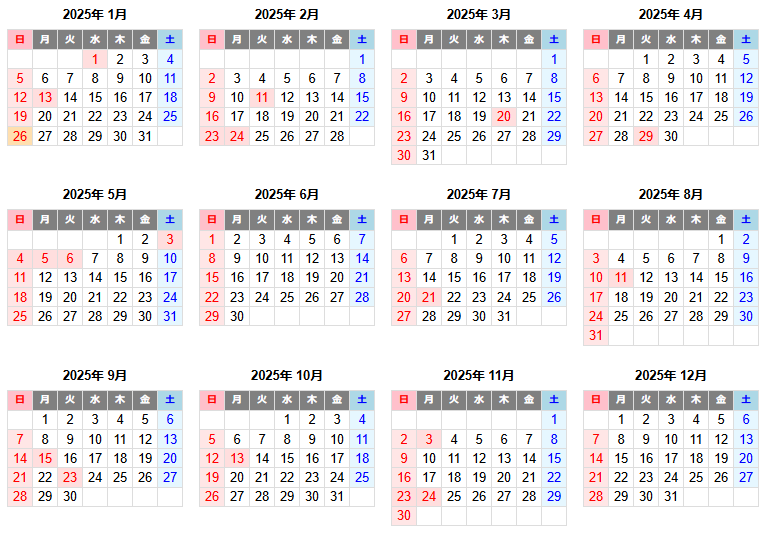
※ 12か月カレンダーは以下。(↓)