JavaScript)無料で使えるAIツール Gemini、ChatGPT、Copilot、リートンでプログラム作成(コード生成)能力を比較。
昨日、無料で使えるAIツール Gemini、ChatGPT、Copilot、リートンに同じ質問をして回答を比較してみた。

今回、これらのツールでJavaScriptプログラム作成能力を比較してみた。
- Google Gemini:〇 OK
- ChatGPT 3.5:〇 OK
- Micosoft Copilot:▲
- リートン:AI検索:△→〇 OK
- リートン:ChatGPT GPT-3.5:▲
- リートン:GPT-4 Tubo:〇 OK
- リートン:Claude Instant:△
- リートン:Claude 2.1:△
- リートン:Google PaLM2:△
■ HTMLテキストボックスに入力されている文字列をリアルタイムにURLのパラメーターに反映する方法を教えて。
【 Google Gemini 】
Google Geminiでは、3つの方法が示された。
※ 期待したプログラムコードが提供された。

【これを使ったサンプル】
※ 正常動作する。
https://ok2nd.github.io/Test/input2url/gemini.html
<!DOCTYPE html>
<html lang="ja">
<head>
<meta charset="UTF-8">
<meta name="viewport" content="width=device-width, initial-scale=1.0">
<title>Input to URL : Google Gemini</title>
</head>
<body>
<h4>Input to URL : Google Gemini</h4>
<input type="text" id="text-box" oninput="updateUrl()">
<script>
function updateUrl() {
	const text = document.getElementById("text-box").value;
	const url = new URL(window.location.href);
	url.searchParams.set("param", text);
	window.history.replaceState({}, "", url.toString());
}
</script>
</body>
</html>


【 ChatGPT 3.5 】
※ 期待したプログラムコードが提供された。

----- ※ 以下省略。
【これを使ったサンプル】
※ 正常動作する。
https://ok2nd.github.io/Test/input2url/chatgpt3.5.html
<!DOCTYPE html>
<html lang="ja">
<head>
<meta charset="UTF-8">
<meta name="viewport" content="width=device-width, initial-scale=1.0">
<title>Input to URL : ChatGPT 3.5</title>
</head>
<body>
<h4>Input to URL : ChatGPT 3.5</h4>
<label for="inputText">Text Input:</label>
<input type="text" id="inputText" oninput="updateURLParameter()">
<script>
function updateURLParameter() {
	// 入力されたテキストを取得
	var inputTextValue = document.getElementById('inputText').value;
	// 現在のURLを取得
	var currentURL = window.location.href;
	// URLにパラメーターが含まれている場合と含まれていない場合で処理を分ける
	if (currentURL.indexOf('?') !== -1) {
		// パラメーターがすでに存在する場合は置き換える
		var updatedURL = currentURL.replace(/(\?|&)text=.*?(&|$)/, '$1text=' + encodeURIComponent(inputTextValue) + '$2');
	} else {
		// パラメーターが存在しない場合は新しく追加する
		var updatedURL = currentURL + '?text=' + encodeURIComponent(inputTextValue);
	}
	// ブラウザの履歴を変更せずにURLを更新
	window.history.replaceState({ path: updatedURL }, '', updatedURL);
}
// ページロード時にURLからパラメーターを読み取ってテキストボックスに反映
window.onload = function () {
	var urlParams = new URLSearchParams(window.location.search);
	var textParam = urlParams.get('text');
	if (textParam !== null) {
		document.getElementById('inputText').value = decodeURIComponent(textParam);
	}
};
</script>
</body>
</html>
【 Microsoft Copilot 】
※ 期待したプログラムコードではなかった。

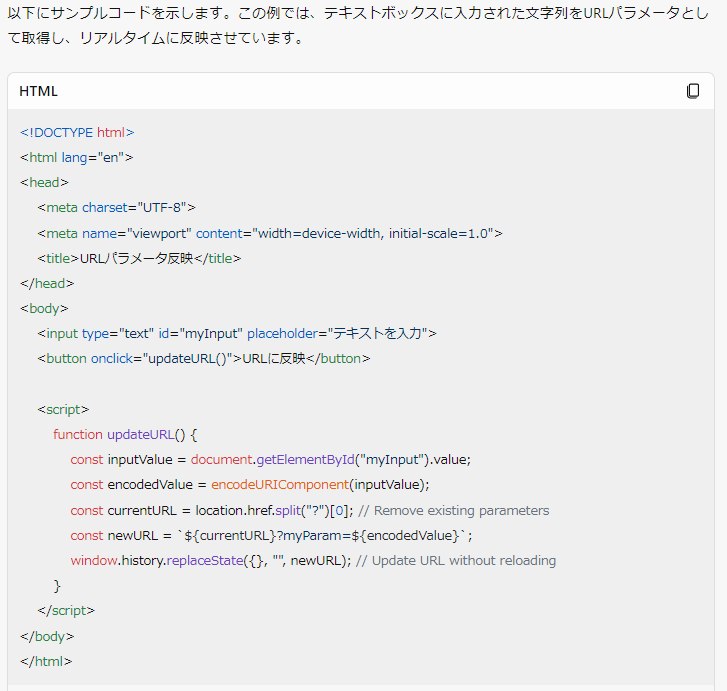
【これを使ったサンプル】
※ この方式ではボタンを押さないといけない。期待したものとは違う。
https://ok2nd.github.io/Test/input2url/copilot.html
<!DOCTYPE html>
<html lang="ja">
<head>
<meta charset="UTF-8">
<meta name="viewport" content="width=device-width, initial-scale=1.0">
<title>Input to URL : Microsoft Copilot</title>
</head>
<body>
<h4>Input to URL : Microsoft Copilot</h4>
<input type="text" id="myInput" placeholder="テキストを入力">
<button onclick="updateURL()">URLに反映</button>
<script>
	function updateURL() {
	const inputValue = document.getElementById("myInput").value;
	const encodedValue = encodeURIComponent(inputValue);
	const currentURL = location.href.split("?")[0]; // Remove existing parameters
	const newURL = `${currentURL}?myParam=${encodedValue}`;
	window.history.replaceState({}, "", newURL); // Update URL without reloading
}
</script>
</body>
</html>
【 リートン:AI検索 】
※ 実際のサンプルコードが提示されなかった。

※ 追加で「実際のサンプルコードを提供して。」と指示したら、提示された。しかし、期待したプログラムコードではなかった。

【これを使ったサンプル】
※ ブラウザの履歴が更新されてしまう。期待したものとは違う。
https://ok2nd.github.io/Test/input2url/wrtn-ai.html
<!DOCTYPE html>
<html lang="ja">
<head>
<meta charset="UTF-8">
<meta name="viewport" content="width=device-width, initial-scale=1.0">
<title>Input to URL : リートン:AI検索 </title>
</head>
<body>
<body>
<h4>Input to URL : リートン:AI検索 </h4>
<input type="text" id="inputText" placeholder="テキストを入力してください">
<!--<button onclick="updateURL()">URLを更新</button>-->
<script>
// URLパラメータを更新する関数
function updateURL() {
	const inputValue = document.getElementById('inputText').value;
	const url = new URL(window.location.href);
	url.searchParams.set('inputValue', inputValue);
	window.history.pushState({}, '', url);
}
// テキストボックスの入力が変更されたときにURLを更新
document.getElementById('inputText').addEventListener('input', updateURL);
</script>
</body>
</html>
※ さらに追加で、「ブラウザの履歴を更新しない方式のサンプルコードを提供して。」と指示したら、期待したコードが提供された。

【これを使ったサンプル】
※ 正常動作する。
https://ok2nd.github.io/Test/input2url/wrtn-ai2.html
<!DOCTYPE html>
<html lang="ja">
<head>
<meta charset="UTF-8">
<meta name="viewport" content="width=device-width, initial-scale=1.0">
<title>Input to URL : リートン:AI検索 </title>
</head>
<body>
<body>
<h4>Input to URL : リートン:AI検索 </h4>
<input type="text" id="inputText" placeholder="テキストを入力してください">
<script>
// URLパラメータを更新する関数
function updateURL() {
	const inputValue = document.getElementById('inputText').value;
	const url = new URL(window.location.href);
	url.searchParams.set('inputValue', inputValue);
	const newUrl = url.toString();
	window.history.replaceState({}, '', newUrl);
}
// テキストボックスの入力が変更されたときにURLを更新
document.getElementById('inputText').addEventListener('input', updateURL);
</script>
</body>
</html>
【 リートン:ChatGPT GPT-3.5 】
※ Aタグのリンク先のURLを変更するもので、期待しているコードではない。

【 リートン:GPT-4 Turbo 】
※ 期待したプログラムコードが提供された。

【これを使ったサンプル】
※ 正常動作する。
https://ok2nd.github.io/Test/input2url/wrtn-gpt4.html
<!DOCTYPE html>
<html lang="ja">
<head>
<meta charset="UTF-8">
<meta name="viewport" content="width=device-width, initial-scale=1.0">
<title>Input to URL : リートン:GPT-4 Turbo</title>
</head>
<body>
<h4>Input to URL : リートン:GPT-4 Turbo</h4>
<input type="text" id="textInput" placeholder="ここに入力">
<!--<p>URL: <span id="urlDisplay">ここにURLが表示されます</span></p>-->
<script>
document.addEventListener('DOMContentLoaded', function() {
	const textInput = document.getElementById('textInput');
	const urlDisplay = document.getElementById('urlDisplay');
	textInput.addEventListener('input', function() {
		const encodedValue = encodeURIComponent(textInput.value);
		const newUrl = `http://example.com/?param=${encodedValue}`;
	//	urlDisplay.textContent = newUrl;
		// URLの更新を実際に行いたい場合は、下記のコメントを解除
		history.replaceState(null, null, `?param=${encodedValue}`);
	});
});
</script>
</body>
</html>
【 リートン:Claude Instant 】
※ 期待したプログラムコードではなかった。

【これを使ったサンプル】
※ ブラウザの履歴が更新されてしまう。期待したものとは違う。
https://ok2nd.github.io/Test/input2url/wrtn-instant.html
<!DOCTYPE html>
<html lang="ja">
<head>
<meta charset="UTF-8">
<meta name="viewport" content="width=device-width, initial-scale=1.0">
<title>Input to URL : リートン:Claude Instant</title>
</head>
<body>
<h4>Input to URL : リートン:Claude Instant</h4>
<input type="text" id="textbox">
<script>
const textbox = document.getElementById('textbox');
textbox.addEventListener('keyup', updateUrl);
function updateUrl() {
	const value = textbox.value;
	// URL更新
	window.history.pushState({}, '', `?query=${value}`);
}
window.addEventListener('popstate', () => {
	const query = new URLSearchParams(location.search).get('query');
	textbox.value = query;
});
</script>
</body>
</html>
【 リートン:Claude 2.1 】
※ 期待したプログラムコードではなかった。

【これを使ったサンプル】
※ ブラウザの履歴が更新されてしまう。期待したものとは違う。
https://ok2nd.github.io/Test/input2url/wrtn-claude2.1.html
<!DOCTYPE html>
<html lang="ja">
<head>
<meta charset="UTF-8">
<meta name="viewport" content="width=device-width, initial-scale=1.0">
<title>Input to URL : リートン:Claude 2.1</title>
</head>
<body>
<h4>Input to URL : リートン:Claude 2.1</h4>
<input type="text" id="inputText" oninput="updateURL()">
<script>
function updateURL() {
	var input = document.getElementById("inputText").value;
	history.pushState(null, null, "?text=" + encodeURIComponent(input));
}
</script>
</body>
</html>
【 リートン:Google PaLM2 】
※ 期待したものとは違う。

