PHP)シンプルなHTMLカレンダー。Google Calendar API v3で祝日表示。コードサンプル。
先日作成したスマホ&PC用検索ポータル「2nd Sch」にカレンダー表示のため、シンプルなHTMLカレンダーを作成。
祝日表示に「Google Calendar API v3」を使用。ただ、祝日は当年の前後合わせて3年分しか取得できない。
【後日2024.12.22記載:重要】※ Google Calendar APIの仕様が勝手に変わってしまったようで、七五三やクリスマスが祝日扱いになってしまった。以下のコードは修正済み。

ミニカレンダーでは、祝日の日付の上をマウスオーバー(hover)すると祝日名が表示される。
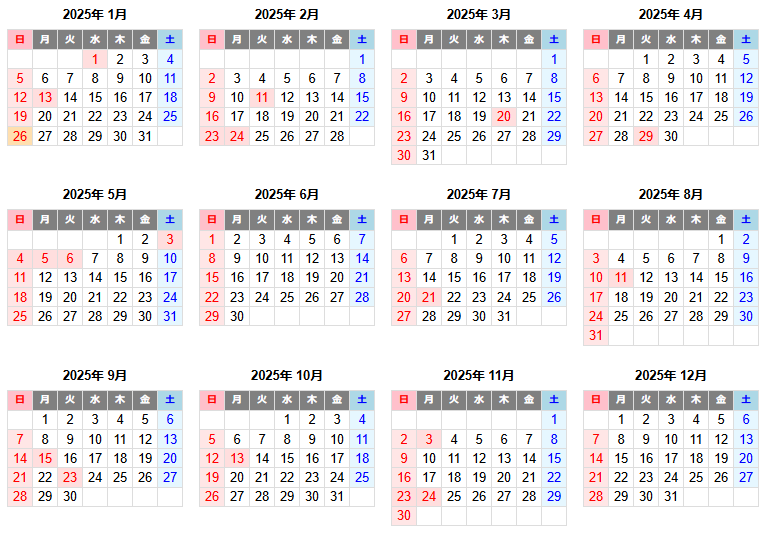
≪ミニカレンダー:今月から1年分≫
https://ok2nd.sakura.ne.jp/index/sch/calendar/
https://ok2nd.sakura.ne.jp/index/sch/calendar/?today=no(当日表示なし)
≪ミニカレンダー:今年1月から1年分≫
https://ok2nd.sakura.ne.jp/index/sch/calendar/?m=1
https://ok2nd.sakura.ne.jp/index/sch/calendar/?m=1&today=no(当日表示なし)
≪ミニカレンダー:2019年1月から1年分≫
https://ok2nd.sakura.ne.jp/index/sch/calendar/?y=2019
≪6か月印刷用カレンダー(改頁付き):2019年1月から1年分≫
※ A4に印刷なら倍率150%で印刷
https://ok2nd.sakura.ne.jp/index/sch/calendar/y6.php?y=2019
≪6か月印刷用カレンダー(改頁付き):2019年4月から1年分≫
※ A4に印刷なら倍率150%で印刷
https://ok2nd.sakura.ne.jp/index/sch/calendar/y6.php?y=2019&m=4
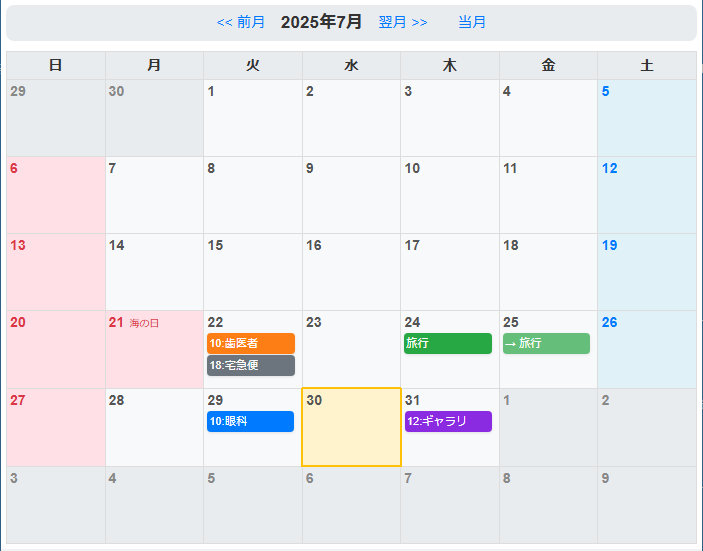
≪カレンダー:今月≫
https://ok2nd.sakura.ne.jp/index/sch/calendar/month.php


≪カレンダー:1か月印刷用≫
https://ok2nd.sakura.ne.jp/index/sch/calendar/month-print.php
※ A4 横向きで100%で印刷

// PHPコードサンプル
<?php
function my_calendar($year, $month, $num) {	// $num: 月数
	$holidays = get_holidays($year);
	for ($i = 1; $i <= $num; $i++) {
		calendar($year, $month, $holidays);
		if ($month++ >= 12) {
			$year++;
			$month = 1;
		}
	}
}
function calendar($year, $month, $holidays) {
	$last_day = date('j', mktime(0, 0, 0, $month + 1, 0, $year));
	$calendar = array();
	$j = 0;
	for ($i = 1; $i < $last_day + 1; $i++) {
		$week = date('w', mktime(0, 0, 0, $month, $i, $year));
		if ($i == 1) {
			for ($s = 1; $s <= $week; $s++) {
				$calendar[$j]['day'] = '';
				$j++;
			}
		}
		$calendar[$j]['day'] = $i;
		$j++;
		if ($i == $last_day) {
			for ($e = 1; $e <= 6 - $week; $e++) {
				$calendar[$j]['day'] = '';
				$j++;
			}
		}
	}
	if ($month == 12) {
		$next_year = $year + 1;
		$next_month = 1;
	} else {
		$next_year = $year;
		$next_month = $month + 1;
	}
	if ($month == 1) {
		$prev_year = $year - 1;
		$prev_month = 12;
	} else {
		$prev_year = $year;
		$prev_month = $month - 1;
	}
?>
<table class="calendar">
<caption><a class="prevnext" href="?y=<?= $prev_year ?>&m=<?= $prev_month ?>"><<</a><span class="title"><?= $year ?>年 <?= $month ?>月</span><a class="prevnext" href="?y=<?= $next_year ?>&m=<?= $next_month ?>">>></a></caption>
	<tr>
		<th class="sunday">日</th>
		<th class="weekday">月</th>
		<th class="weekday">火</th>
		<th class="weekday">水</th>
		<th class="weekday">木</th>
		<th class="weekday">金</th>
		<th class="saturday">土</th>
	</tr>
	<tr>
<?php
	$cnt = 0;
	foreach ($calendar as $key => $value) {
		$ymd = $year.'-'.$month.'-'.$value['day'];
		if (isset($holidays[$ymd])) {
			$holiday_class = ' holiday';
			$holidays_name = '<p class="holidays_name">'.$holidays[$ymd].'</p>';
		} else {
			$holiday_class = '';
			$holidays_name = '';
		}
?>
		<td class="<?= ($cnt == 0) ? 'sunday' : '' ?><?= ($cnt == 6) ? 'saturday' : '' ?><?= $holiday_class ?><?= ((date('Y') == $year) && (date('m') == $month) && (date('d') == $value['day'])) ? ' today' : '' ?>"><?php $cnt++; ?><span><?= $value['day'] ?></span><?= $holidays_name ?></td>
<?php
		if ($cnt == 7) {
			$cnt = 0;
?>
	</tr>
	<tr>
<?php
		}
	}
?>
	</tr>
</table>
<?php
}
function get_holidays($year) {	// 祝日2年分取得 ($year ~ $year+1)
	$holidays = array();
	$google_api_key = '(Google API KEY)';
	$holidays_id = 'ja.japanese.official%23holiday@group.v.calendar.google.com';
	$url = 'https://www.googleapis.com/calendar/v3/calendars/'.$holidays_id.'/events'
		.'?key='.$google_api_key
		.'&timeMin='.$year.'-01-01T00:00:00Z'
		.'&timeMax='.($year+1).'-12-31T00:00:00Z'
		.'&maxResults=100'
		.'&orderBy=startTime'
		.'&singleEvents=true';
	if ($results = file_get_contents($url, true)) {
		$results = json_decode($results);
		foreach ($results->items as $item ) {
			if ((string) $item->summary != '大晦日' && (string) $item->summary != '銀行休業日') {
				$date = strtotime((string) $item->start->date);
				$name = (string) $item->summary;
				$holidays[date('Y-n-j', $date)] = $name;
			}
		}
	}
	return $holidays;
}
?>
// ミニカレンダーで、祝日の日付の上をマウスオーバー(hover)で祝日名を表示するCSSサンプル

<td class="holiday"><span>24</span><p class="holidays_name">秋分の日 振替休日</p></td>
<style>
.holidays_name {
	display: none;
	position: absolute;
	margin: -1px 0 0 8px;
	padding: 5px;
	color: #f00;
	background: #fff;
	border: solid 1px #f00;
	-webkit-border-radius: 4px;
	-moz-border-radius: 4px;
	border-radius: 4px;
}
td.holiday span:hover + p.holidays_name {
	display: block;
}
</style>
// 高さの異なるボックスを横に並べるならfloatよりinline-block
<style>
table.calendar {
	margin: 5px;
	display: inline-block;
	vertical-align: top;
	font-size: 12px;
}
</style>
<table class="calendar">.....</table>
<table class="calendar">.....</table>
<table class="calendar">.....</table>
<table class="calendar">.....</table>




神戸・西宮)灘五郷の酒蔵マップ作成。灘五郷の酒蔵マップを作成。酒造会社名でなく、銘柄で載せている。 西から順番に、以下の銘柄を載せた。全てにショップや見学場所がある訳ではない。…晴歩雨描 · 
