JavaScriptで、複数のWEBPファイルをアップロードして、JPEGに変換して一括ダウンロードするWebページ。Geminiで作成。
先日、JavaScriptで、複数のPNGファイルをアップロードして、JPEGに変換して一括ダウンロードするWebページを作成。

今回、JavaScriptで、複数のWEBPファイルをアップロードして、JPEGに変換して一括ダウンロードするWebページを作成。コードは、Google Geminiに聞いた。
https://ok2nd.github.io/tool/photo/webp2jpeg/
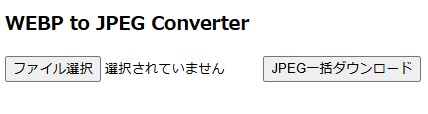
JPEGファイルは、JSZipライブラリでZIPファイルに圧縮して一括ダウンロードする。JavaScriptだけで処理しているので、画像データがサーバーサイドに送られる事はない。
【HTML】
<!DOCTYPE html>
<html>
<head>
<meta charset="UTF-8">
<title>WEBP to JPEG Converter</title>
</head>
<body>
<h3>WEBP to JPEG Converter</h3>
<input type="file" id="fileInput" multiple>
<button id="downloadButton">JPEG一括ダウンロード</button>
<script src="https://cdnjs.cloudflare.com/ajax/libs/jszip/3.10.1/jszip.min.js"></script>
<script src="webp2jpeg.js"></script>
</body>
</html>
【JavaScript】
const fileInput = document.getElementById('fileInput');
const downloadButton = document.getElementById('downloadButton');
downloadButton.addEventListener('click', () => {
	const files = fileInput.files;
	if (files.length === 0) {
		alert('ファイルを選択してください。');
		return;
	}
	const convertedImages = [];
	const zip = new JSZip();
	for (let i = 0; i < files.length; i++) {
		const file = files[i];
		const reader = new FileReader();
		reader.onload = (e) => {
			const img = new Image();
			img.onload = () => {
				const canvas = document.createElement('canvas');
				canvas.width = img.width;
				canvas.height = img.height;
				const ctx = canvas.getContext('2d');
				ctx.drawImage(img, 0, 0);
				canvas.toBlob((blob) => {
					const newFileName = file.name.replace('.webp', '.jpg');
					zip.file(newFileName, blob, {base64: true});
					convertedImages.push(blob);
					if (convertedImages.length === files.length) {
						zip.generateAsync({type: "blob"})
							.then(function(content) {
								// ダウンロードリンクの作成
								const a = document.createElement('a');
								const url = URL.createObjectURL(content);
								a.href = url;
								a.download = 'converted_images.zip';
								a.click();
								URL.revokeObjectURL(url);
							});
					}
				}, 'image/jpeg');
			};
			img.src = e.target.result;
		};
		reader.readAsDataURL(file);
	}
});