JavaScript版「ブラウザで縦書き表示&印刷」作成。「window.opener」を使えば、親子ウインドウ間のデータ受け渡しは簡単。
以前、「ブラウザでテキスト縦書き表示」するページを作成した。
CSS)ブラウザで縦書き表示&印刷。PHP版。HTML、CSSで縦書き表示するWebページを作成。任意の文章に、以下のようなCSSを指定したHTMLページを生成する。 <style> -…晴歩雨描 · 
この時作成したのは、サーバーサイドでPHPで処理して縦書きページを表示する方式だった。
今回、PHPを使わずにJavaScriptでクライアントサイドで縦書きページを作成する。
https://ok2nd.github.io/tool/tategaki/index-js.html

フォント等のオプション選択画面のページ「index-js.html」で「縦書き表示」ボタンを押すと、ブラウザの新しいタブで縦書き表示ページ「tategaki.html」を開く。
【 index-js.html 】
<form>
	...
	...
	<input type="button" value="縦書き表示" onclick="return tategaki();">
</form>
...
...
<script>
function tategaki() {
	var new_win = window.open('tategaki.html');
}
</script>
【 tategaki.html 】
子ウインドウ「tategaki.html」で、自分自身を開いた親ウィンドウ「index-js.html」のデータを取得するのは簡単。「window.opener」を使えば、親ウィンドウのデータを参照できる。親ウィンドウ「tategaki.html」の<form>の各項目にidを付けておけば、以下のような感じで参照できる。
document.body.style.fontFamily = '"' + window.opener.document.getElementById("fontfamily").value + '",serif,sans-serif';
document.body.style.fontWeight = window.opener.document.getElementById("fontweight").value;
document.getElementById("honbun").style.lineHeight  = window.opener.document.getElementById("lineheight").value;
document.getElementById("title").innerHTML = window.opener.document.getElementById("title").value;
document.getElementById("subtitle").innerHTML = window.opener.document.getElementById("subtitle").value;
var honbun = window.opener.document.getElementById("honbun").value;
document.getElementById("honbun").innerHTML = honbun.replace(/\n/g, '<br>');
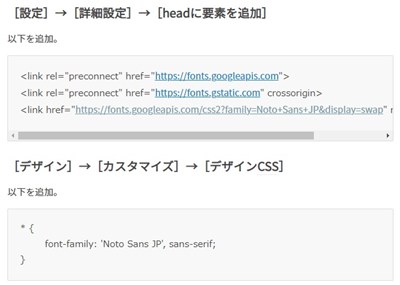
なお、今回、フォントの選択肢にGoogle Fonts「Noto Serif JP」「Noto Sans JP」を追加。
【 Noto Serif JP 印刷サンプル】

【 Noto Sans JP 印刷サンプル】

※ 印刷に関しては、ブラウザのバージョンによって、印刷が正常に行えない可能性あり。この記事を書いている時点では、Chromeが一番まともに印刷できる。