CSS)ChromeとFirefoxでボタン<button>の見た目を同じにする。シンプルな影付きボタン。
ブラウザのChromeとFirefoxで、ボタン<button>の見た目がなかなか同じにならない。
理由は、「ユーザーエージェント・スタイルシート(User Agent Stylesheet)」という各ブラウザが独自に持っているデフォルト設定が異なるため。
極力、ChromeとFirefoxで見た目が同じになるCSSを作成。
ただし、font-family:がsans-serifでは、同じフォントにならない。font-family:で、Webフォント"Noto Sans JP"を使うことで同じになる。
■ サンプル
https://ok2nd.github.io/tool/css/button.html
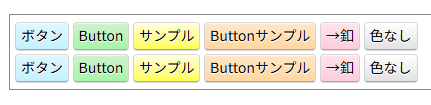
《 font-family の指定 》
<link href="https://fonts.googleapis.com/css2?family=Noto+Sans+JP:wght@400;500;700&display=swap" rel="stylesheet">

<style>
body {
	font-family: "Noto Sans JP", sans-serif;
}
</style>
《 CSS 》
button,
input[type=button],
input[type=reset],
input[type=submit] {
	margin: 2px 0;
	padding: 0 5px;
	height: 28px;
	font-size: 14px;
	box-shadow: 0 1px 0 rgba(0,0,0,0.15), inset 0 1px 1px 0 rgba(255,255,255,0.6);
	border-radius: 4px;
	background-image: linear-gradient(to bottom, #ffffff, #e1e1e1);
	border: 1px solid #dadada;
	border-bottom-color: #a9a9a9;
	cursor: pointer;
}
.btn-blue {
	background-image: linear-gradient(to bottom, #e0f7ff, #c4f1ff);
}
.btn-green {
	background-image: linear-gradient(to bottom, #d0f2d0, #a8f4a8);
}
.btn-yellow {
	background-image: linear-gradient(to bottom, #ffffe0, #ffff56);
}
.btn-orange {
	background-image: linear-gradient(to bottom, #ffe7c9, #ffd7a0);
}
.btn-pink {
	background-image: linear-gradient(to bottom, #ffe2eb, #ffccdc);
}



CSS)<pre>で等幅フォントを使う。はてなブログ の<pre> で 等幅フォント を使う方法の備忘録。 以下のスタイルを追加。 <style> pre { font-famil…晴歩雨描 · 
